Web Hosting
 Windows HostingBuilt for Windows apps and websites – stability, speed and flexibility
 Reseller HostingLaunch a hosting business without technical skills or expensive infrastructure
 Affiliate ProgramRefer customers and earn commissions from sales across our platform
 Domain SearchFind and secure a domain name in seconds with our quick lookup tool
 CO ZA Domains
 All DomainsExplore domain names from over 324 TLDs globally – all in one place
 Free Whois Lookup Tool South Africa
 VPS
VPS Website Builder
 Online ShopSet up a sleek eCommerce store with zero coding knowledge
 SSLs
SSLs SupportAccess help articles, how-tos, and everything about our services
 Blog
Blog Contact UsReach our team instantly via live chat or drop us an email
You have decided to get a .co.za domain. That is a smart move.
Now you want to know exactly how to register a .co.za domain without wasting time or money.
This guide walks you through every click. No technical words. No confusion.
You will be live in under five minutes. Let us start.

Table of Contents
Before You Start: What You Need
You need two things before registering.
First, a business name that is not already taken. Have two or three backup names ready.
Second, a working email address and a payment method (card or EFT). That is it.
No ID required. No long forms. No hidden contracts.
Truehost makes the process simple for South Africans.
Step 1: Go to Truehost and Search for Your Domain
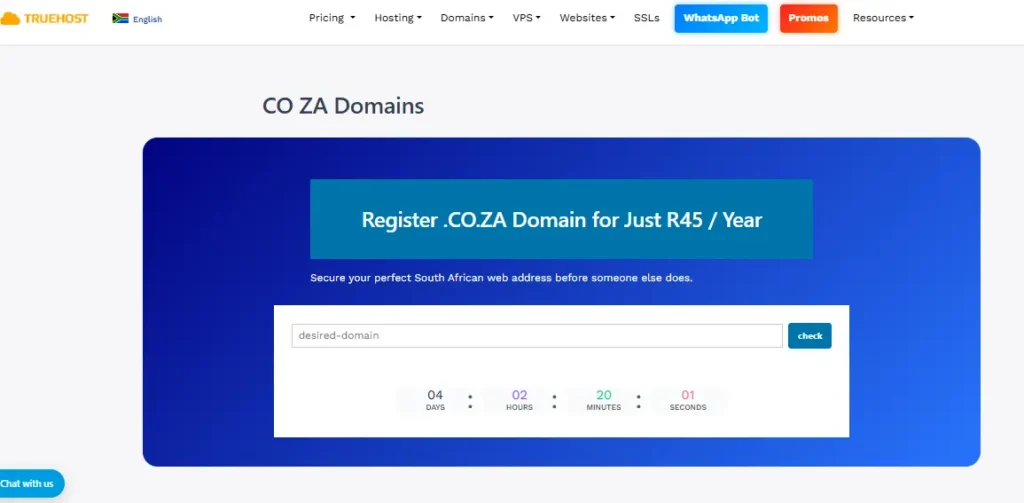
Open your browser. Go to truehost.co.za.
Look for the domain search bar right on the homepage. It is big and easy to find.
Type your desired name into the search bar. For example: yourbusiness.co.za.
Do not include the “www” part. Just the name and .co.za.

Hit the search button or press Enter. The system checks availability instantly.
Step 2: Check the Results
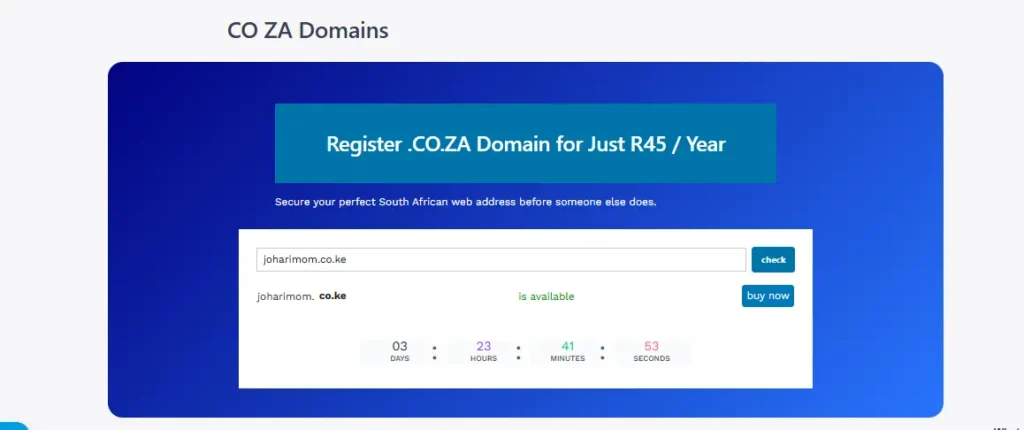
The search results will tell you one of two things.
If your domain is available, you will see a green success message and an “Add to Cart” button.
If your domain is taken, you will see a red message. Do not worry.
Truehost will suggest alternative names that are still free.
Here are three quick alternatives if your first choice is taken:
- Add your location:
yourbusinessjhb.co.zaoryourbusinesscpt.co.za - Add what you sell:
yourbusinessplumbing.co.zaoryourbusinesscatering.co.za - Add a short word:
getyourbusiness.co.zaorhelloyourbusiness.co.za
Pick one that works and click “Add to Cart”.
Step 3: Choose Your Registration Period
You can register your .co.za domain for one year or multiple years.
The longer you register, the less you pay per year on average.
Truehost offers flexible periods: monthly, quarterly, half-yearly, yearly, and even 36-month plans.
For most small businesses, one year is perfect. You can always renew later.
If you want to lock in your domain name for longer, choose two or three years. That protects you from forgetting to renew.
Step 4: Review Your Cart and Proceed to Checkout
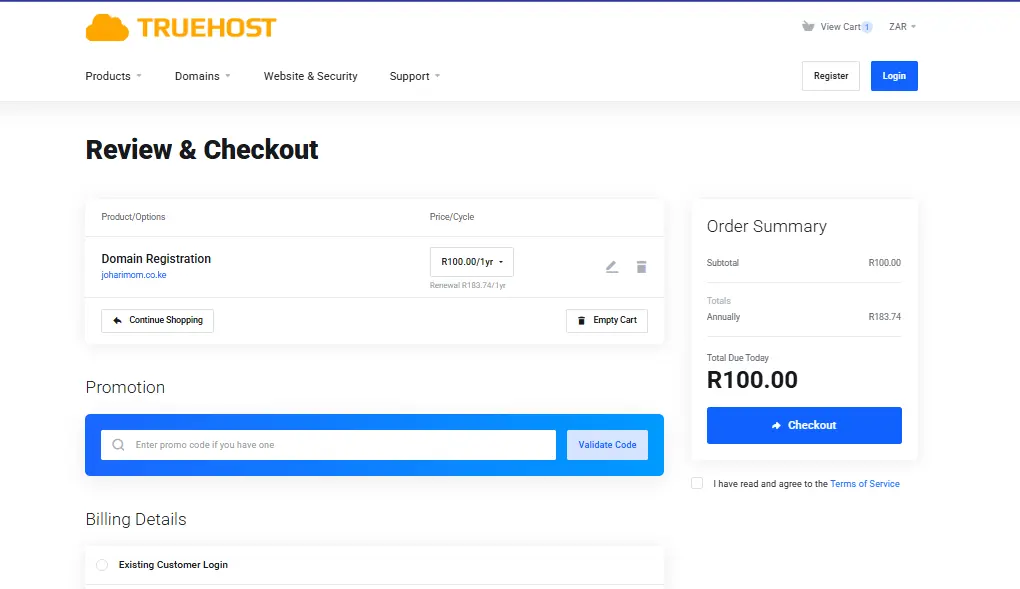
Your cart will show the domain name, registration period, and total price.
Take a moment to double-check everything. Make sure the spelling is correct.
Check that you selected the right domain extension (.co.za, not .com or .org.za).
Click “Checkout” when you are ready.
Step 5: Enter Your Contact Details for how to Register a .co.za Domain
You will be asked to provide basic contact information.
This includes your name, email address, phone number, and physical address.
All information must be accurate and valid. Truehost uses this for domain ownership records.
Do not worry. Your personal details are kept private. Truehost offers WHOIS privacy protection.
That means spammers cannot see your personal contact info when they search for your domain owner.
Step 6: Choose Your Payment Method and Pay
Truehost accepts several payment methods.
You can pay by credit card, debit card, or EFT (electronic funds transfer).
The price for a .co.za domain starts at R59 per year at the standard rate.
Right now, there is a promotional price of R50 for new registrations (limited 7-day offer).
Here is the important part. Truehost does not raise prices at renewal.
What you pay in year one is the same in year two. No hidden fees. No surprise jumps.
Complete the payment. Your domain will be activated instantly.
Step 7: Access Your Domain Dashboard
After payment, you will receive a confirmation email.
Log into your Truehost client area using the credentials you created.
You will see your new .co.za domain listed in your dashboard.
From here, you can manage everything: DNS settings, auto-renewal, domain locking, and more.
Take a few minutes to explore the dashboard. Everything is clearly labelled.
Step 8: Configure Your DNS Settings (If You Have Hosting)
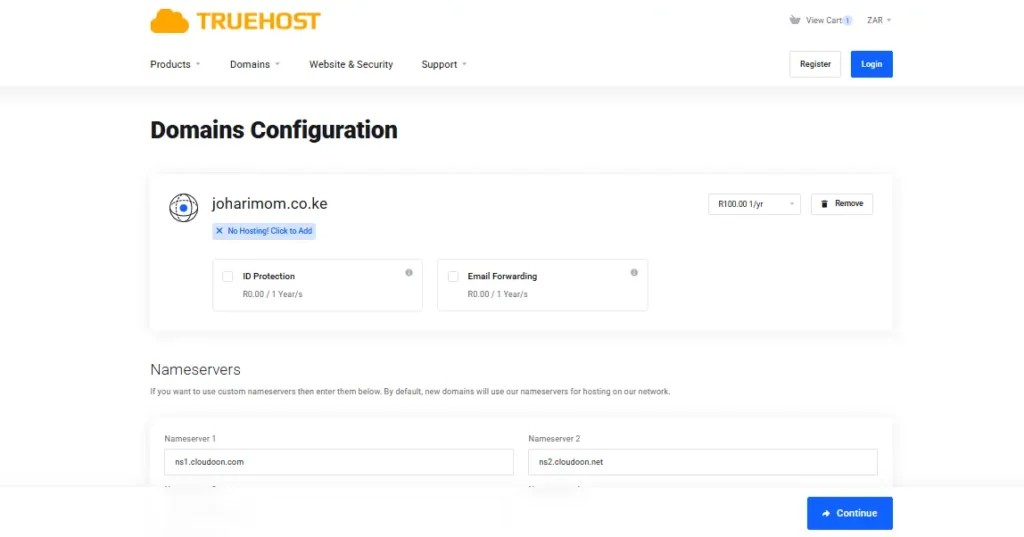
If you already have a website, you need to point your domain to it.
DNS stands for Domain Name System. It tells the internet where to find your website files.
Truehost gives you full DNS management through cPanel.
You can edit common record types: A records, CNAME, MX (for email), and TXT records.
If you are using Truehost hosting, the DNS settings are pre-configured for you. No extra work needed.
If you are using another hosting provider, you will need to update your nameservers or add an A record pointing to your host’s IP address.
That sounds complicated, but Truehost support can help you in under five minutes via WhatsApp.
Step 9: Set Up Domain Locking and Auto-Renewal
Two security features are worth turning on immediately.
Domain locking prevents unauthorised transfers to another registrar. Turn this on and keep it on.
Auto-renewal ensures your domain does not expire accidentally.
Truehost sends reminder emails before renewal, and you can enable automatic billing.
Both settings are found in your domain management dashboard.
With auto-renewal on, you never have to worry about someone else grabbing your domain after it expires.
Step 10: Create Professional Email Addresses
One of the best parts of owning a .co.za domain is the email.
Instead of [email protected], you can create [email protected].
Truehost includes free email hosting with most plans. You can create multiple mailboxes.
Examples: sales@, admin@, support@, billing@, hello@.
A professional email address instantly makes you look more serious and trustworthy.
Customers are far more likely to reply to a .co.za email than a free Gmail address.

Why Register a .co.za Domain Instead of .com?
You might still be wondering if .co.za is the right choice.
Here is the truth. A .co.za domain tells Google you are a local South African business.
That means you rank higher when customers search for services near them.
Also, .co.za domains are cheaper to register and renew. On Truehost, you pay as little as R50 for the first year.
And most importantly, South African customers trust .co.za more than .com. They see it as one of their own.
So if you are ready, let me show you how to register a co za domain step by step.
Optional: Get a Free .co.za Domain with Hosting
Here is a smart way to save money.
If you need website hosting anyway, Truehost gives you a free .co.za domain for one year when you buy an annual hosting plan.
The WebHosting Starter plan costs R33 per month (paid yearly at R396 total).
That includes your free .co.za domain, 30 GB SSD storage, unlimited bandwidth, unlimited email accounts, and a free SSL certificate.
Your domain renewal after the free year is only around R89. No price jumps.
Compare that to other providers. Some charge R1,068 per year just to get a “free” domain.
Truehost gives you the real deal. No tricks.
Pricing Summary Table
| Item | Truehost Price | Notes |
|---|---|---|
| .co.za domain (promo) | R50 | Limited 7-day promotion |
| .co.za domain (standard) | R89 | Same price every year |
| WebHosting Starter + free .co.za | R33/month (R396/year) | Best value for hosting + domain |
| Domain renewal (year 2+) | R89 | No surprise price jumps |
| WHOIS privacy protection | Free | Included automatically |
Troubleshooting: Common Issues When You Register a .co.za Domain
Issue 1: I searched for my domain and it says “taken”. What do I do?
Try the alternative suggestions above (add location, descriptor, or prefix). Truehost will also show you similar available names.
Issue 2: How long until my domain goes live?
Instantly after payment. You can start using it immediately for email or website hosting.
Issue 3: I forgot my Truehost login details.
Click “Forgot Password” on the login page. You will receive a reset link via email.
Issue 4: Can I transfer an existing .co.za to Truehost?
Yes. Truehost offers free .co.za transfers. The process is simple and support can guide you.
Issue 5: What if I do not want hosting right now?
You can register just the domain and park it. Later, you can add hosting when you are ready.
Issue 6: I made a typo in my domain name. Can I change it?
Domain names cannot be edited. But you can register the correct spelling as a new domain. Truehost support can help you cancel the mistaken one within a short window.
Issue 7: Can I register multiple .co.za domains at once?
Yes. Truehost allows bulk registration. Just add each domain to your cart and check out once.
Support Options
Truehost offers support in ways that work for South Africans.
You can reach them via:
- 24/7 WhatsApp support – a real South African team answers your questions
- Live chat on the website
- Email tickets for detailed issues
No automated robots. No waiting days for a reply.
What to Do After You Register Your .co.za Domain
You have now learned how to register a co za domain on Truehost. Congratulations.
Here is what you should do next.
a) set up your professional email address. Use [email protected] on your business cards.
b) point your domain to a website. Even a simple one-page site with your hours and location helps.
c) submit your website to Google Search Console. That helps Google find and rank you faster.
d) add your .co.za email to your WhatsApp business profile. Customers will see it and trust you more.
e) print your domain on receipts, flyers, and vehicle decals. Make it visible everywhere.
Why Truehost Is the Best Choice for South Africans
You have many options to register a .co.za domain.
But Truehost stands out for five reasons.
One, prices are honest. What you see is what you pay.
Two, local support speaks your language and understands loadshedding.
Three, no hidden renewal fees. Your price stays the same.
Four, you get free extras: WHOIS privacy, DNS management, email hosting.
Five, Truehost has been serving African businesses for over a decade. They are not a fly-by-night company.
Frequently Asked Questions
Q: Can I register a .co.za domain without a South African ID?
Yes. Truehost does not require ID. Anyone can register.
Q: What is the difference between registering and hosting?
Registering buys the domain name (the address). Hosting rents space for your website files (the house). You need both for a live website.
Q: How do I know if my domain is active?
Log into your Truehost dashboard. Your domain will show “Active” status. You can also type it into a browser – it should show a parked page or your website.
Q: Can I sell my .co.za domain later?
Yes. You can transfer ownership to another person or business. Truehost support can help with the process.
Q: What happens when my domain expires?
Truehost sends reminder emails before expiry. If you do not renew, the domain enters a grace period. After that, it becomes available for anyone to register.
Final Words
You now know exactly how to register a co za domain with Truehost.
The steps are simple. The price is low. The benefits are huge.
Your domain is your digital home. It protects your brand. It builds trust. It helps Google find you.
Do not wait until someone else takes your name.
Search for your .co.za domain now
Go to truehost.co.za. Type your name. Claim it before someone else does.
It takes two minutes. It costs as little as R50. And it is yours forever.