Web Hosting
 Windows HostingBuilt for Windows apps and websites – stability, speed and flexibility
 Reseller HostingLaunch a hosting business without technical skills or expensive infrastructure
 Affiliate ProgramRefer customers and earn commissions from sales across our platform
 Domain SearchFind and secure a domain name in seconds with our quick lookup tool
 CO ZA Domains
 All DomainsExplore domain names from over 324 TLDs globally – all in one place
 Free Whois Lookup Tool South Africa
 VPS
VPS Website Builder
 Online ShopSet up a sleek eCommerce store with zero coding knowledge
 SSLs
SSLs SupportAccess help articles, how-tos, and everything about our services
 Blog
Blog Contact UsReach our team instantly via live chat or drop us an email
It depends on which version of n8n you mean. There is the self-hosted Community Edition and n8n Cloud.
These are not the same product, and they do not work the same way when it comes to pricing.
n8n is genuinely open source, so you can download the code, run it on your own server, and pay no one a cent.
But that does not mean automation suddenly becomes free in practice. Running open-source software still costs something, even if the software itself does not.

The real difference comes down to who handles the operational work.
If you manage the server yourself, the software costs nothing. If you want someone else to handle hosting, updates, and maintenance, you pay for that convenience.
The open-source label creates an expectation of free, but the reality depends on how much you are willing to take on yourself.

Let’s see what you actually get for free, what the cloud version costs, and which route makes more sense for your situation.
Table of Contents
What Free n8n Entails
The n8n Community Edition is the free, self-hosted version of the platform. You run it on your own infrastructure and pay nothing to n8n for the software itself.
With the free version, you get access to all 400+ native integrations and the HTTP Request node for any API you want to connect.
You can build unlimited workflows and run unlimited executions with no throttling or artificial caps.
All core features are available, including code nodes where you can write JavaScript or Python directly in your workflows, AI nodes with LLM support, and the full visual editor experience.
The Community Edition genuinely gives you the complete automation toolkit without gating core functionality behind a paywall.
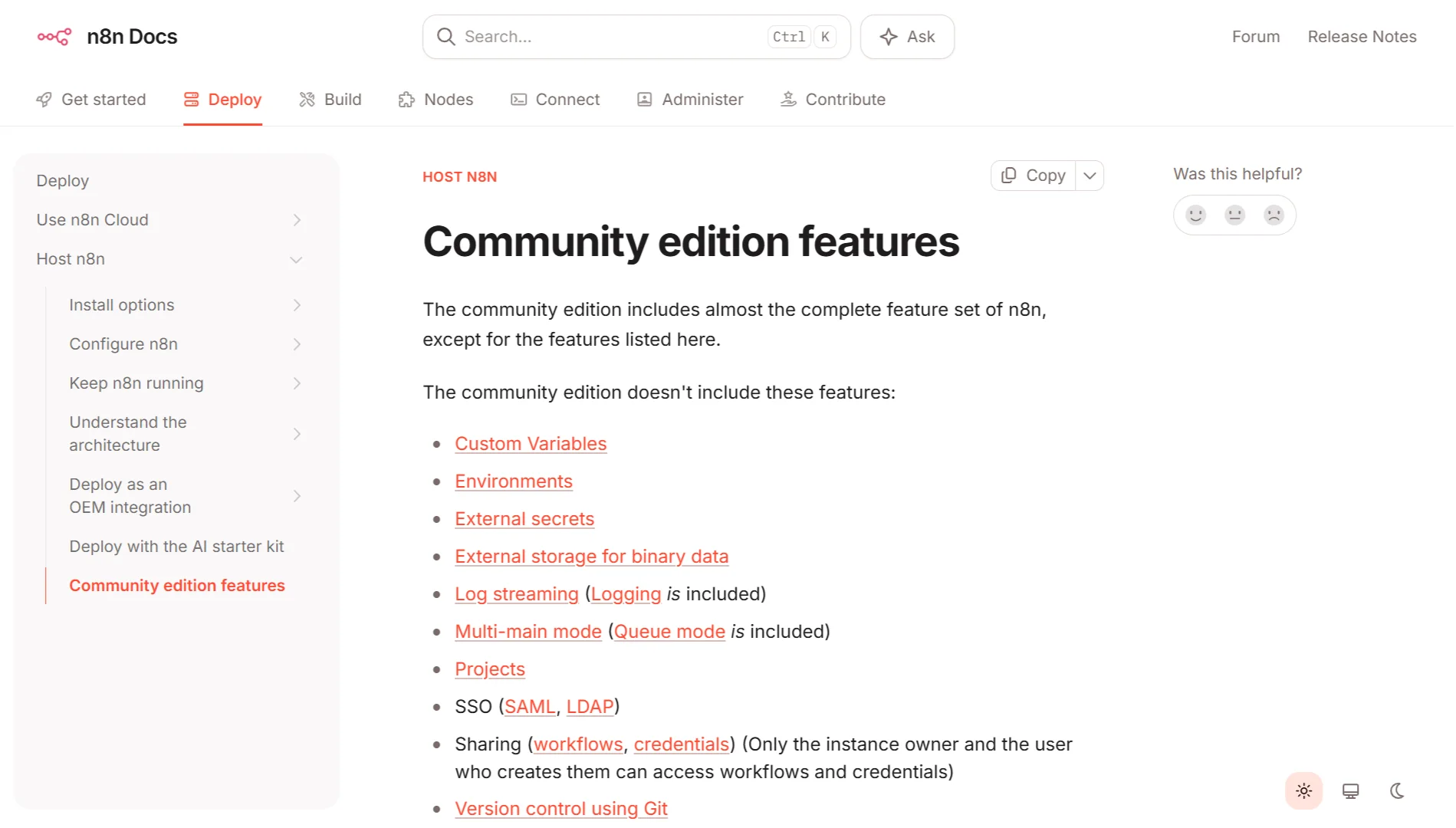
What is not included are the enterprise extras. You do not get Single Sign-On (SSO) or LDAP integration for centralized authentication.
There is no Git-based version control for your workflows. Log streaming to external services, such as Datadog, is unavailable. Advanced role-based access control and project-level sharing are not included.
External secret store integration and environment separation for dev, staging, and production are also reserved for paid tiers.
The real cost of free n8n is not monetary to the vendor. It is the infrastructure you have to run and the time you spend managing it.
You need a server or VPS with at least 2GB of RAM and 20GB of storage to get started, though 4GB is recommended for production use. You have to handle the Docker setup or the npm installation yourself.
You are responsible for backups, updates, security patches, and monitoring. You configure the reverse proxy and SSL certificates manually. You fix things when they break.
When you factor in these hidden costs, free n8n can actually cost you time. For a developer who already manages servers, it is genuinely free.
For a non-technical team or a small business without dedicated ops resources, operational costs often outweigh the savings.
Is It Free Forever?
Yes, the Community Edition is free to use indefinitely. There is no time limit, no hidden expiration, and no license to renew. You can keep running your instance as long as you maintain the infrastructure behind it.
That said, n8n does occasionally add new features to the free edition. Registering your Community Edition with an email address unlocks extras like folders for organizing workflows, debugging tools, and the ability to save custom execution data.
These additions do not change the core free offering, and n8n has never removed features from the free version. They may add more advanced capabilities to paid tiers over time, but what you get on day one will remain free.
How Much is n8n Cloud?
n8n Cloud is the fully managed version of the platform where n8n handles hosting, updates, monitoring, and scaling for you.
You pay a flat monthly fee based on a tier that defines how many workflow executions you get each month.
The 2026 pricing structure is execution-based. You pay per complete workflow run, regardless of how many steps that workflow contains.
A workflow with 5 steps costs the same to run as a workflow with 50 steps. This is different from competitors like Zapier and Make, which charge per action or per operation.
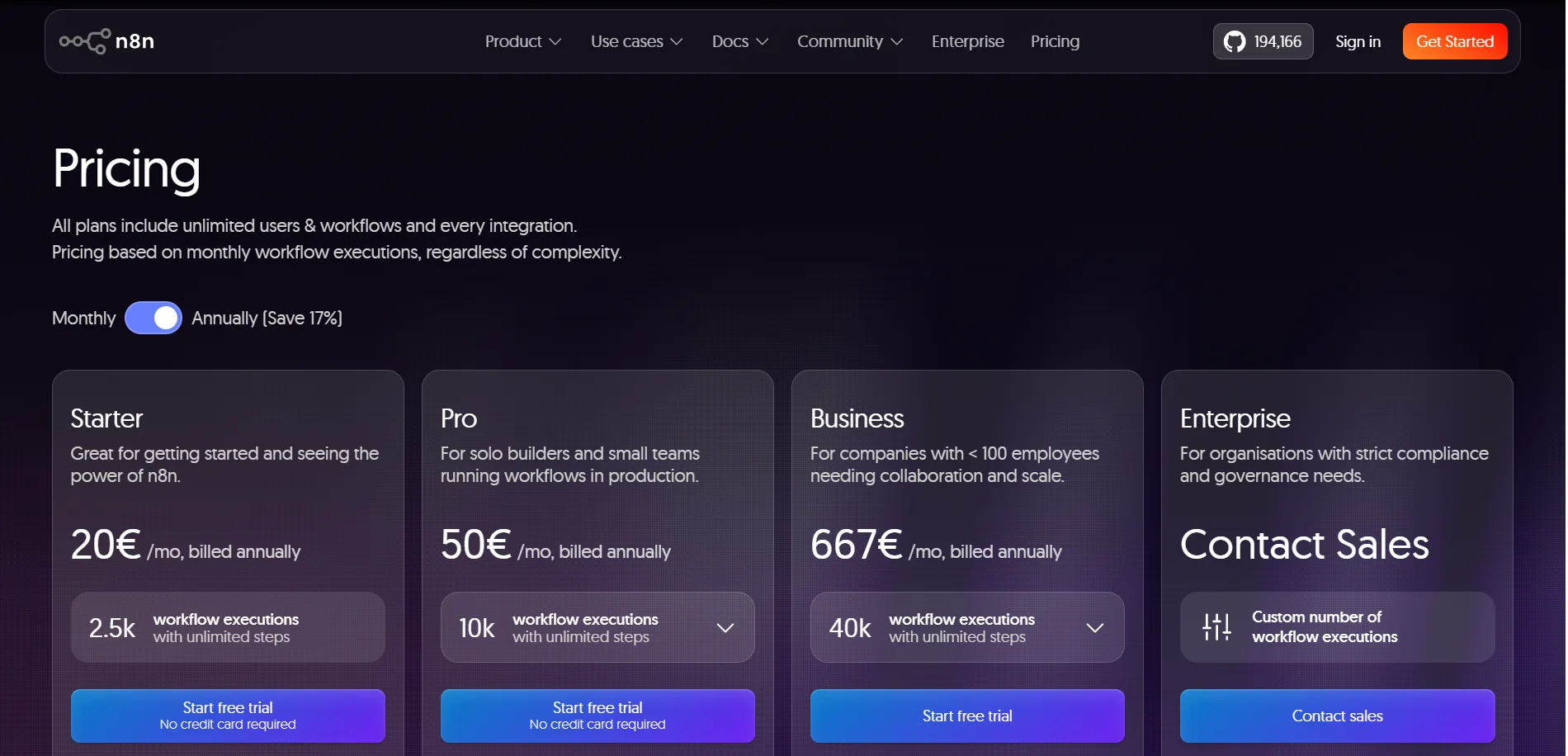
The Starter plan costs €24 per month when billed monthly, or €20 per month with an annual commitment. It includes 2,500 monthly executions, which works out to roughly 83 executions per day.
You get 5 concurrent executions, 1 shared project, and 5 days of workflow history.
The Pro plan runs €60 per month or €50 annually. It gives you 10,000 monthly executions (about 333 per day), 20 concurrent executions, 3 shared projects, and 30 days of workflow history.
The Business plan is designed for self-hosted deployments with enterprise features. It costs €800 per month (€667 annually) for 40,000 monthly executions, which comes to roughly 1,333 per day.
You get SSO and SAML support, Git integration, 6 shared projects, and unlimited workflow history.

The Enterprise plan has custom pricing and typically includes unlimited executions, dedicated support with SLAs, advanced security features, and unlimited projects.
You have to contact n8n directly for a quote.
One important detail is that executions do not roll over to the next month. If you do not use your full allocation, the remaining executions expire.
And if you exceed your limit, workflows pause rather than continuing and generating unexpected charges, so you will not get a surprise bill
Self-Hosted vs. Cloud
| Aspect | Self-Hosted Community | n8n Cloud |
| Cost | Free software; pay only for infrastructure (VPS, storage, bandwidth) | Fixed monthly fee per tier |
| Workflow Executions | Unlimited; capped only by your hardware capacity | Capped per plan tier |
| Features | All core functionality; no SSO, Git, or advanced RBAC | Full feature set available on higher tiers |
| Setup & Maintenance | You handle Docker, SSL, updates, backups, and monitoring | Fully managed by n8n |
| Data Control | 100% on your own servers | Data stored on n8n infrastructure |
| Support | Community forums only | Email support on paid plans; dedicated support on Enterprise |
| Scaling | Manual capacity planning and scaling | Automatic within plan limits |
| Technical Requirement | Server administration and Linux knowledge required | None; browser-based setup |
Should You Pick Free n8n or Cloud n8n?
Choose the self-hosted Community Edition if you have the technical capacity to manage a server and you want maximum control over your data and costs.
The self-hosted path makes the most sense for individual developers, technical teams, and any organization that already runs its own infrastructure.
The savings are significant at scale, since the only ongoing cost is your VPS, typically $5 to $20 per month for a small server.
Choose n8n Cloud if you value your time more than the money you would save by self-hosting.
If you are a small business without a developer on staff, or if you need enterprise features like SSO and audit logs without the complexity of managing them yourself, the managed option is worth the monthly fee.
The Starter and Pro plans are priced for teams that want to focus on building automations rather than maintaining servers.
The math favors self-hosting for high-volume users. Once your monthly execution count exceeds the Business plan’s 40,000 limit, the per-execution cost on cloud plans becomes expensive.
Self-hosted Community Edition has no such caps, so your cost remains fixed regardless of how many workflows you run.
For most people reading this, the decision comes down to one question:
Are you comfortable managing your own server? If the answer is yes, go self-hosted. If the answer is no, pay for the cloud.
Is n8n Free FAQs
Where can I host my n8n workflow for free?
There is no free hosting for n8n unless you run it on your own local machine. Some cloud providers offer free trial credits for new accounts, but these are temporary.
You could run n8n on a free-tier cloud instance from providers like Oracle or Google Cloud, but these have resource limitations and are not suitable for production workloads. The Community Edition itself is free, but the infrastructure to run it costs money.
How long can I use n8n for free?
Indefinitely. The Community Edition is free to use with no time limits. You can install it on your own server and run it for as long as you want without paying a cent to n8n. Just be aware that you are responsible for maintaining the server and keeping the software up to date.
How to get n8n for free lifetime?
Install the Community Edition on your own VPS and keep it running. No license key or activation is required. The software remains free forever, and the license does not expire. You will need to handle updates yourself, but the base installation costs nothing.
Is there any free alternative to n8n?
There are other open-source workflow automation platforms, but they generally offer less functionality. Pipedream offers a free tier with limited executions.
Apache Airflow is powerful but geared toward data engineering rather than general automation. For most use cases, n8n’s Community Edition is the strongest free option available because it combines a broad integration library with a user-friendly visual editor.
Is n8n worth paying for?
That depends entirely on your situation. If you are a developer who can manage a server, the self-hosted Community Edition provides the same core functionality as the paid plans without the monthly cost.
The paid versions are worth it if you lack the technical capacity to self-host or need enterprise features such as SSO, Git integration, audit logging, and dedicated support. For growing teams that cannot afford a dedicated ops person, the cloud plans are a good investment.
Run n8n on Your Own VPS
Looking to host n8n yourself? Truehost offers KVM VPS plans built specifically for the job. Full control, no run limits, and no per-execution fees.
You get root SSH access, so you can install community nodes, customize Docker files, or run your own scripts. We set up PostgreSQL, configure reverse proxies, and issue free SSL certificates.
Pick your plan:
- N8N KVM1 – R171.53/month. 1 vCPU, 2 GB RAM, 50 GB NVMe, 4 TB bandwidth.
- N8N KVM2 – R335.14/month. 2 vCPUs, 4 GB RAM, 100 GB NVMe, 8 TB bandwidth.
Both include unlimited workflows, concurrent executions, queue mode, community nodes, and 100+ pre-made workflows.
Just choose your server size, and our one-click templates do the rest. Log in to your editor, add your API keys, and start automating.