Web Hosting
 Windows HostingBuilt for Windows apps and websites – stability, speed and flexibility
 Reseller HostingLaunch a hosting business without technical skills or expensive infrastructure
 Affiliate ProgramRefer customers and earn commissions from sales across our platform
 Domain SearchFind and secure a domain name in seconds with our quick lookup tool
 CO ZA Domains
 All DomainsExplore domain names from over 324 TLDs globally – all in one place
 Free Whois Lookup Tool South Africa
 VPS
VPS Website Builder
 Online ShopSet up a sleek eCommerce store with zero coding knowledge
 SSLs
SSLs SupportAccess help articles, how-tos, and everything about our services
 Blog
Blog Contact UsReach our team instantly via live chat or drop us an email
Let Me Show You the R8 Email Trick.You are paying too much for email.
I know that sounds like a sales pitch. But pull up your last bank statement. Look at what you paid Google or Microsoft last month. It was probably R60, R70, or even R90 per mailbox.
Now multiply that by 5 employees. Or 10.
That money should be going to inventory. Or marketing. Or your own salary.
We built cheap business email South Africa at Truehost because we were in your shoes. We ran a startup. We hated the big bills. So we made our own email system.
It costs R8 per month (billed every three years). That is R288 total for 36 months. Less than what some people spend on takeout coffee in a week.
Here is exactly how to set it up.
Table of Contents
Wait, Is R8 Email Actually Any Good?
Good question. You get what you pay for, right?
Normally yes. But email is old technology. It has been solved for 20 years. The big companies charge you for fancy logos and AI features you never use.
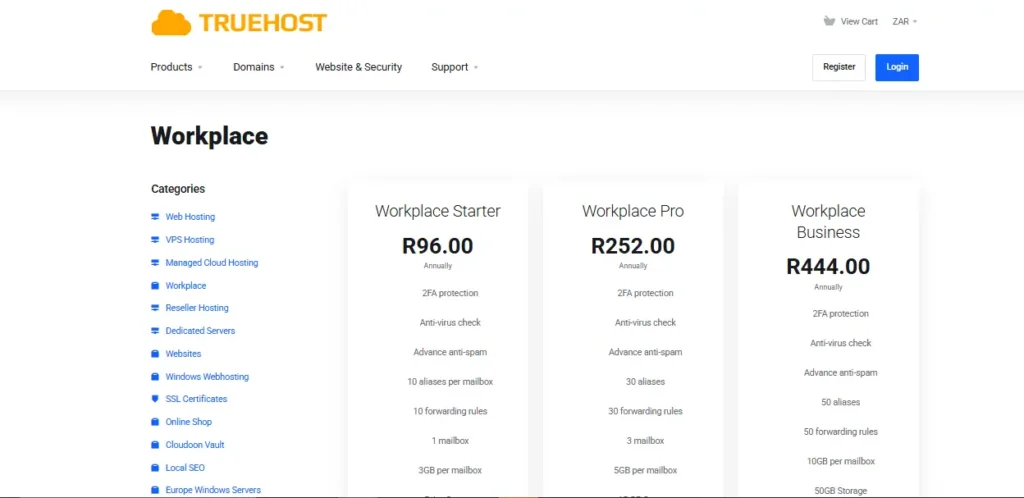
Here is what you actually get from our R8 plan:
- A professional address like [email protected]
- 3GB of storage (that is roughly 50,000 plain emails)
- Access from your phone, laptop, or tablet
- Spam filtering that actually works
- Our version of Google Docs and Sheets (included, no extra fee)
- WhatsApp support from humans in South Africa
What you do not get:
- Video conferencing (use the free Zoom account you already have)
- Unlimited storage (you will hit 3GB in about 3 years if you get 50 emails a day)
- Phone support at 2 AM (but our WhatsApp replies within hours)
For R8? That is a deal.
Before You Start: Grab a Domain
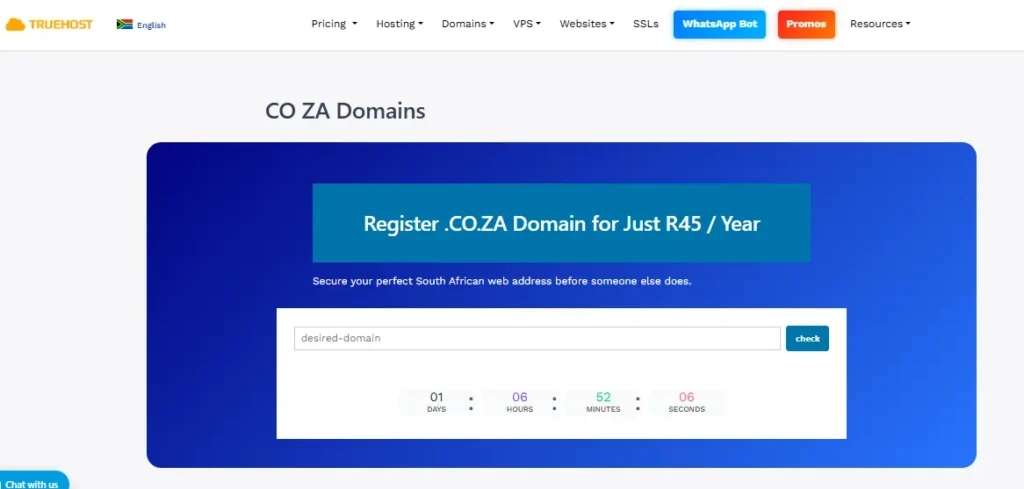
You need a domain name. That is the @yourstartup.co.za part.
If you already have one, skip this section. If not, buy one now. A .co.za domain costs about R45per year at Truehost.
Here is how to check if your domain is available:
- Go to truehost.co.za
- Type your startup name into the search bar
- If it is free, add it to your cart
Pro tip: Do not overthink the domain name. Your startup name plus .co.za is fine. You can always add more domains later. Just get something live today.
Now lets look at the steps
Step 1: Pick Your Payment Plan (The R8 Trick)
Here is where most people get confused.
The R8 price is not available if you pay month-to-month. That would lose us money. The monthly price is R35.
To get the cheap business email South Africa price of R8, you pay for three years upfront.
Total: R288
That sounds like a lot of money at once. But break it down:
- R8 per month
- R96 per year
- Less than one dinner delivery per month
If you cannot pay R288 today, take the monthly R35 plan. You can switch to the triennial plan later. We will migrate your emails for free.
Which one should you pick?
- Bootstrapping founder with cash flow issues: Monthly R35
- Funded startup or established side hustle: Triennial R8
- Testing us out: Monthly R35 for one month, then switch
I recommend the triennial plan if you can swing it. You forget about the payment for three years. That is peace of mind.
Step 2: Add Workplace to Your Cart
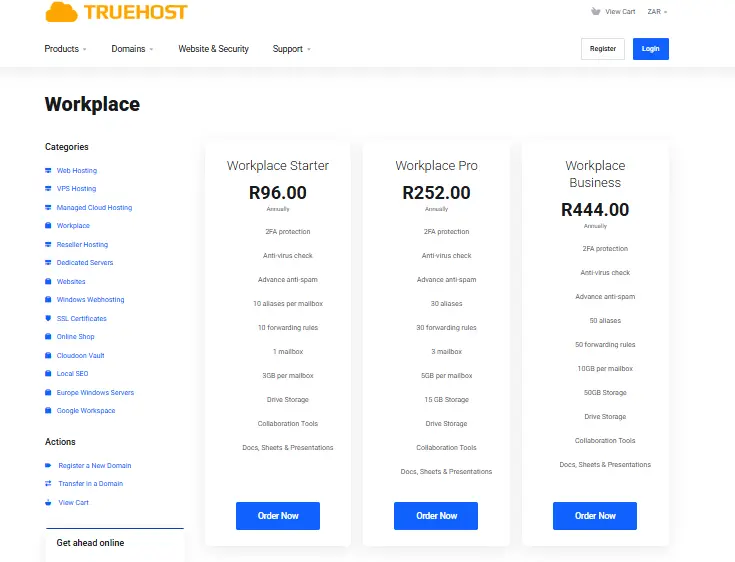
You have your domain. Now you add the email service.
- On the Truehost website, click “Workplace” in the top menu
- Select “Starter”
- Choose your billing cycle (Triennial for R8, Monthly for R35)
- Enter the number of mailboxes you need
How many mailboxes? One per person.
Do not buy one mailbox and share it. That breaks our terms of service. Plus, sharing a password is a security risk. Buy one for each team member.
A team of 3 people pays R24 per month on the triennial plan. That is R864 for three years. Google would charge you R2,160+ for the same period.
Step 3: Checkout in Rands (No Forex Surprises)
I hate international billing.
You see $1.99 on a website. You think “great, that is R37.” Then your bank adds a 3% forex fee. Then SARS adds 15% VAT on the converted amount. Then the exchange rate drops overnight.
Suddenly your “cheap” email costs R65.
We do not play that game.
When you check out at Truehost, the price is in South African Rands. What you see is what you pay. No forex. No surprises.
Payment methods we accept:
- PayFast (instant EFT from FNB, Standard Bank, ABSA, Nedbank, Capitec)
- Debit card (Visa or Mastercard)
- Credit card
- Bank transfer (EFT – takes 1-2 days to clear)
Once you pay, check your email. We send you a Welcome Email with your invoice and your login details. Keep that email somewhere safe.
Step 4: Create Your First Mailbox
This is where you actually build the email address.
Log in to the Truehost Client Area. Use the username and password from your Welcome Email.
Once you are inside, look for the “Workplace Admin” section. It looks like a little envelope icon or a dashboard tile.
Click “Create New User” .
Now fill in the form:
- First Name: Thabo
- Last Name: Nkosi
- Username: thabo (this becomes [email protected])
- Password: Make it strong. Use a capital letter, a number, and a symbol. Do not use “password123” – we will not save you from yourself.
- Storage Limit: Leave it at 3GB unless you want to upgrade now
Click Save.
That is it. Your email address exists.
Test it immediately. Log in to webmail at webmail.yourstartup.co.za. Send a test email to your personal Gmail. Then reply from Gmail back to your new business address. Make sure the flow works.
Step 5: Set Up Your Phone (The Part Everyone Fears)
This is where people get stuck. But it is easy. I promise.
You do not need special software. Use the email app already on your phone.
For iPhone users:
Open Settings > Mail > Accounts > Add Account > Other > Add Mail Account.
Enter your name, your full email address, and your password.
Tap Next. Your phone will verify the settings. It takes about 10 seconds.
For Android users:
Open the Gmail app. Tap your profile picture in the top right. Tap Add another account. Select Other (IMAP) .
Enter your full email address and password.
The incoming server is mail.truehost.co.za. The outgoing server is the same.
Tap Next.
For computer users (Outlook, Thunderbird, or Apple Mail):
Same servers. But make sure you use port 587 and encryption STARTTLS. If you use port 25 or 465, it will not work. I have seen this mistake a hundred times.
Still stuck? Message us on WhatsApp. The number is in your Welcome Email. We will walk you through it. No chatbots. No tickets. Just a human typing back.
What About Load Shedding?
You live in South Africa. You know the lights go off.
If your email server is in your office, you lose email during load shedding. That is bad.
Our servers are not in your office. They are in Teraco data centers in Johannesburg. Teraco has industrial generators, massive battery banks, and contracts with Eskom for priority power.
Your email works when your lights do not. That is the point of cloud hosting.
How to Save Even More Money
You came here for cheap business email South Africa. Let me give you two more tricks.
Trick 1: Use a catch-all address
Go to Workplace Admin > Domain Settings > Catch-All. Turn it on.
Now anything sent to [email protected] lands in your main inbox. If a client mistakenly emails support@ instead of hello@, you still get the message. You never lose a lead because of a typo.
Trick 2: Do not buy storage you do not need
3GB sounds small. But a plain text email is 5KB. A newsletter with images is 50KB. A PDF attachment is 500KB.
Do the math:
- 50 plain emails per day = 250KB per day = 9MB per month = 108MB per year
- You hit 3GB after 27 years at that rate.
You only need more storage if you send or receive large attachments constantly. Most startups do not. Start with 3GB. Upgrade later if you need to.
Pricing Table (No Hidden Rows)
Here is exactly what you pay. No asterisks. No “conditions apply.”
| Plan | Billing Cycle | Your Cost Today | Monthly Equivalent |
| Workplace Starter (Best for most) | Every 3 years | R288 | R8.00 |
| Workplace Starter | Monthly | R35 | R35.00 |
| Workplace Business | Monthly | R35 | R35.00 (but with 10GB storage) |
| Workplace Pro | Monthly | R69 | R69.00 (50GB storage) |
Add a domain: R89 per year (first year often free with hosting bundles)
Add a second mailbox: Same price as the first. A team of 5 on the triennial plan pays R1,440 for three years. That is R480 per year total. Google charges that for one person.
What South African Founders Say
I am not going to fake testimonials. Here are real messages from our WhatsApp support logs (names changed for privacy):
“I moved from Gmail to Truehost yesterday. Setup took 15 minutes. My clients stopped asking why I use a Gmail address. Worth it.” – Ahmed, CPT
“Your support helped me at 10 PM on a Sunday. I was about to give up. Thank you.” – Lerato, JHB
*”The R8 plan saved my side hustle. I was paying R200/month at my old host for the same thing.” – Bongani, DUR*
What If You Hate It?
You have 30 days.
If you do not like our cheap business email South Africa service, we refund your full R288. No forms to fill out. No “escalation to a manager.” You just open a ticket saying “refund me” and we do it.
Why? Because if you stay for 3 years, we make R8 per month. If you leave, we lose nothing by giving your money back. It is not worth arguing over.
Common Questions (Short Answers)
Can I use this with my existing Gmail app?
Yes. The setup steps above work with the standard Gmail app on Android and iPhone.
Do I need a website to use this email?
No. You can buy email hosting without buying web hosting. Just the domain and the Workplace plan.
What if my startup grows from 3 people to 10 people?
You add more mailboxes in the Workplace Admin panel. It takes 2 minutes per new person. The price stays R8 each.
Is this only for .co.za domains?
No. You can use .com, .org, .africa, or any other domain. The .co.za is just the cheapest option.
Does Truehost read my emails?
No. That would be illegal. And a terrible business model.
Final Step: Stop Using Gmail for Business
You have read this far. That means you want to switch.
So do it today.
Go to truehost.co.za/workplace. Pick the triennial Starter plan. Pay R288. Follow the 5 steps above.
Tomorrow morning, you will wake up to a professional inbox. No more “I will send you a contract from my personal Gmail.” No more clients wondering if you are a side hustle.
You are a real business. Get the email that proves it.
CTA Signup
Start Your R8/mo Truehost Workplace Plan
30-day refund. WhatsApp support. No forex fees.