Web Hosting
 Windows HostingBuilt for Windows apps and websites – stability, speed and flexibility
 Reseller HostingLaunch a hosting business without technical skills or expensive infrastructure
 Affiliate ProgramRefer customers and earn commissions from sales across our platform
 Domain SearchFind and secure a domain name in seconds with our quick lookup tool
 CO ZA Domains
 All DomainsExplore domain names from over 324 TLDs globally – all in one place
 Free Whois Lookup Tool South Africa
 VPS
VPS Website Builder
 Online ShopSet up a sleek eCommerce store with zero coding knowledge
 SSLs
SSLs SupportAccess help articles, how-tos, and everything about our services
 Blog
Blog Contact UsReach our team instantly via live chat or drop us an email
Most South African business owners set up a Google Business Profile, wait a few weeks, and wonder why they still do not appear in local search results. The missing piece is almost always the same their website and domain are not set up to back up their Google listing.
Your .co.za domain is not just a web address. When used correctly, it becomes one of the strongest local SEO signals telling Google exactly where your business operates and who it serves.
This guide shows you, step by step, how to use your .co.za domain name to rank on Google Maps South Africa.
Table of Contents
Why Your .co.za Domain and Google Maps Local SEO South Africa Go Together
Google Maps rankings also called the Local Pack are based on three things: relevance, distance, and prominence. Your .co.za domain directly influences all three when your website is built and linked correctly.


A .co.za domain tells Google that your business serves South Africa. When that domain consistently appears across your Google Business Profile, your website, and other online directories, Google gains confidence in your location and pushes you higher in local results.
How your .co.za domain supports Google Maps rankings:
| Ranking Signal | How Your .co.za Domain Helps | Priority |
| Google trusts local domains | .co.za signals South African presence to Google | High |
| NAP consistency | Your domain ties your name, address and phone together | High |
| Local landing pages | yourdomain.co.za/cape-town targets local searches | High |
| Backlinks | Local .co.za sites linking to you boosts authority | Medium |
| Schema markup | LocalBusiness schema on your .co.za site helps Google read your location | Medium |
Step 1: Register or Check Your .co.za Domain for Local SEO South Africa
Before anything else, your domain name itself needs to work for local SEO. A well-chosen .co.za domain can contain your city or service, which helps Google and customers immediately.
Choose a domain that includes a location or service keyword
You do not have to completely rebuild your brand around this. Even a small adjustment can help. Here are some examples of domains that naturally signal local intent:
- capetownaccountants.co.za
- johannesburgplumbing.co.za
- pretoriadentist.co.za
- durbanweddingphotographer.co.za
If you already have a branded domain like smithslaw.co.za, that is perfectly fine. The domain name is just one of many signals it is not the only one.
Make sure your .co.za domain is active and loading correctly
A domain that times out or throws an error will not help your Google Maps ranking. Google needs to visit your website to verify your business details. Run through this quick check:
- Type your .co.za domain into a browser and confirm it loads
- Check that it redirects correctly (www to non-www, or vice versa)
- Confirm your SSL certificate is active your domain should show https://
- Make sure your contact page is visible and easy to find
Step 2: Set Up Your Google Business Profile and Link Your .co.za Domain
Your Google Business Profile (GBP) is what appears in Google Maps when someone searches for your type of business in your area. Linking it correctly to your .co.za domain is the foundation of your local SEO South Africa strategy.
Fill in your Google Business Profile completely
Incomplete profiles rank lower. Use this table as your setup checklist:
| Google Business Profile Field | What to Put There |
| Business Name | Use your exact trading name — no keyword stuffing |
| Website URL | Your .co.za domain — e.g. yourbusiness.co.za |
| Business Category | Choose the most specific category available |
| Description | Include your city, suburb and main service naturally |
| Phone Number | Must match the number on your website exactly |
| Address | Must match your website contact page exactly |
Add your .co.za domain to the website field exactly
When you enter your website URL in your Google Business Profile, use your full .co.za domain with https:// at the front. Do not shorten it or use a redirect link. Google checks that the URL resolves correctly.
If you have multiple locations, create a separate Google Business Profile for each one and link each to a location-specific page on your .co.za domain for example, yourbusiness.co.za/cape-town or yourbusiness.co.za/johannesburg.
Step 3: Match Your NAP Details Across Your .co.za Website and Google Maps
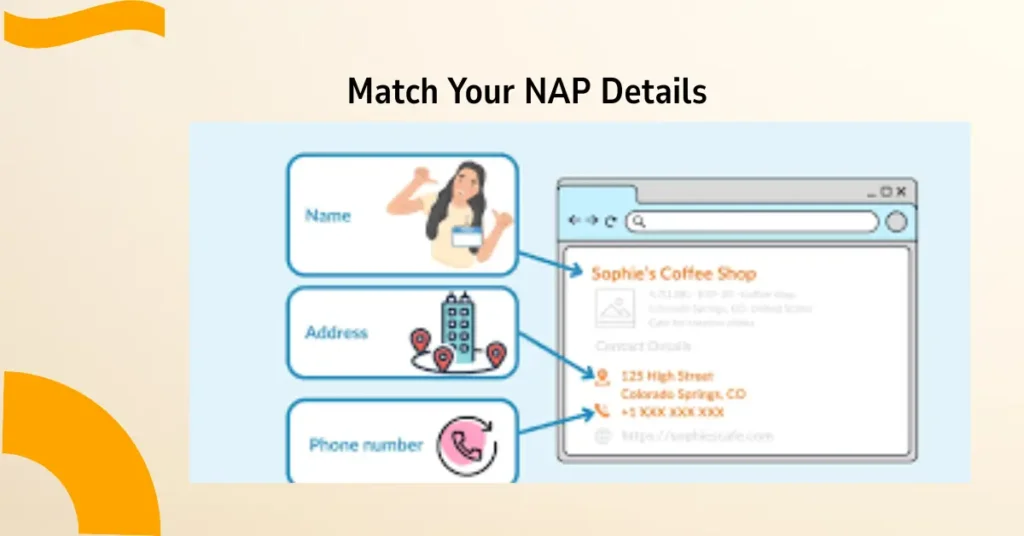
NAP stands for Name, Address, and Phone Number. Google cross-checks these details between your Google Business Profile and your website. If they do not match exactly, it weakens your local ranking signal.
This is one of the most common local SEO mistakes South African businesses make — and it is one of the easiest to fix.
Your NAP must be identical on every platform:

| Detail | Google Business Profile | Your .co.za Website |
| Business Name | Cape Town Plumbers | Cape Town Plumbers |
| Phone | 021 123 4567 | 021 123 4567 |
| Address | 14 Main Rd, Observatory | 14 Main Rd, Observatory |
| Website | capetownplumbers.co.za | capetownplumbers.co.za |
Put your NAP details in the footer of every page on your .co.za website. This way, Google finds consistent information no matter which page it crawls.
Step 4: Create Location Pages on Your .co.za Domain
A location page is a dedicated page on your website for each city, town, or suburb you serve. This gives Google a specific URL to associate with each location and gives local customers a page that speaks directly to them.
What a good location page includes
- Your business name, address and phone number for that area
- A Google Maps embed showing your location
- A description of the services you offer in that specific area
- A photo of your team or premises in that location
- Customer reviews or testimonials from clients in that area
- A clear call to action phone number, WhatsApp link or booking form
How to structure your location page URLs
Use clean, descriptive URLs on your .co.za domain. Keep them short and include the location and service. For example:
- yourbusiness.co.za/plumber-cape-town
- yourbusiness.co.za/accounting-johannesburg
- yourbusiness.co.za/dentist-pretoria-east
These URLs tell Google exactly what the page is about before it even reads the content.
Step 5: Add LocalBusiness Schema Markup to Your .co.za Website
Schema markup is code that helps Google read your website’s information more accurately. For local SEO South Africa, the LocalBusiness schema is the most important one to add.
It tells Google your business name, address, phone number, opening hours, and the geographic area you serve all in a format Google can process quickly and confidently.
How to add LocalBusiness schema to your .co.za site
- Go to schema.org/LocalBusiness and use a free schema generator
- Fill in your business details — use the exact same NAP as your GBP
- Set the areaServed field to your city or province
- Copy the generated JSON-LD code
- Paste it into the <head> section of every page on your .co.za website
- Test it using Google’s Rich Results Test tool
If your website runs on WordPress, plugins like Yoast SEO or Rank Math can generate and add this schema automatically you just fill in your business details in the settings.
Step 6: Build Local Citations Using Your .co.za Domain
A local citation is any mention of your business online that includes your NAP details and links back to your .co.za domain. The more consistent citations you have, the stronger your Google Maps presence becomes.
Where to list your .co.za business in South Africa
- Google Business Profile — first priority
- Yelp South Africa
- Yellow Pages South Africa (yellowpages.co.za)
- Brabys (brabys.com)
- Cylex South Africa (cylex.co.za)
- Your local chamber of commerce website
- Industry-specific directories — e.g. Private Property for estate agents, Justeat for restaurants
Every listing must use the exact same business name, address, phone number and .co.za domain URL. Even a small difference — like writing ‘Street’ in one place and ‘St’ in another — can reduce the strength of your citation signal.
Common Google Maps Local SEO Mistakes South African Businesses Make
Before you go, check your current setup against this table. Any one of these errors can push you down in Google Maps results even if everything else is set up correctly.
| Common Mistake | What to Do Instead |
| Using a .com domain for a local SA business | Register a .co.za domain to signal local presence |
| Keyword stuffing your business name on GBP | Use your real trading name only |
| Inconsistent NAP across listings | Copy-paste the exact same details everywhere |
| No location pages on your website | Create a page for each area you serve |
| Ignoring Google reviews | Ask every happy client to leave a Google review |
How Long Does It Take to Rank on Google Maps South Africa?
Most businesses start to see movement in their Google Maps rankings within 4 to 12 weeks of completing all the steps above. This depends on how competitive your industry is, how many reviews you have, and how old your .co.za domain is.
An older .co.za domain that has been active for two or more years tends to rank faster than a brand new one. If you are just registering your .co.za domain, be consistent with your local SEO activity and give it at least 90 days before drawing conclusions.
Your .co.za Domain Google Maps South Africa Local SEO Checklist
Use this before you close this article to track where you are:
- Register a .co.za domain that includes your city or service (if possible)
- Make sure your .co.za domain loads correctly with an active SSL certificate
- Create and fully complete your Google Business Profile
- Link your .co.za domain to your Google Business Profile website field
- Match your NAP details exactly on your GBP and your website
- Add your NAP to the footer of every page on your .co.za site
- Create a dedicated location page for each area you serve
- Add LocalBusiness schema markup to your .co.za website
- List your business on South African directories with your .co.za domain
- Ask satisfied clients to leave Google reviews on your Business Profile
Start Using Your .co.za Domain to Rank on Google Maps South Africa Today
Every step in this guide builds on the one before it. You do not need to do everything in one day but the sooner you start, the sooner Google Maps starts sending local customers your way.
Your .co.za domain is already working for you as a local trust signal. The steps above turn it into a full local SEO engine that tells Google exactly where you are, who you serve, and why you should appear at the top of the map.
If you do not yet have a .co.za domain, or you want to add a location keyword to your domain strategy, Truehost South Africa offers .co.za domain registration starting from a few rand per year with full DNS control so you can set up everything in this guide yourself.