Web Hosting
 Windows HostingBuilt for Windows apps and websites – stability, speed and flexibility
 Reseller HostingLaunch a hosting business without technical skills or expensive infrastructure
 Affiliate ProgramRefer customers and earn commissions from sales across our platform
 Domain SearchFind and secure a domain name in seconds with our quick lookup tool
 CO ZA Domains
 All DomainsExplore domain names from over 324 TLDs globally – all in one place
 Free Whois Lookup Tool South Africa
 VPS
VPS Website Builder
 Online ShopSet up a sleek eCommerce store with zero coding knowledge
 SSLs
SSLs SupportAccess help articles, how-tos, and everything about our services
 Blog
Blog Contact UsReach our team instantly via live chat or drop us an email
Your .co.za domain is like your shop sign on the internet. It shows people who you are and where to find you.
Most owners worry about hosting and website design. But many forget that the domain itself can be stolen, copied, or lost.
This guide will walk you through simple steps to protect co za domain from hijacking. You will learn about fake renewal emails, domain expiry, and how to lock your domain.
You will also see how a provider like Truehost can help with renewal reminders, domain lock, WHOIS privacy, and safer logins.

Table of Contents
What Does It Mean to Protect Your .co.za Domain from Hijacking?
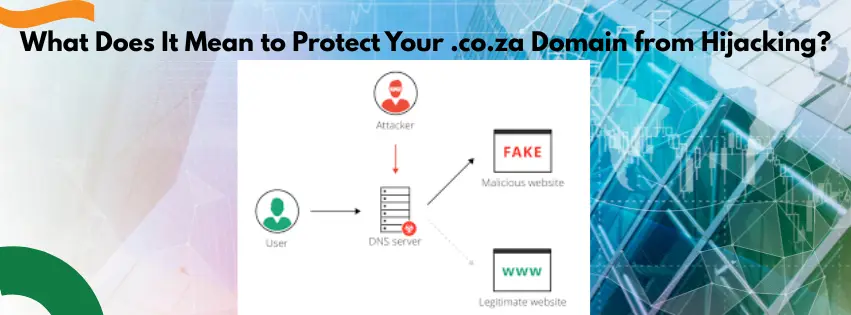
Let me first explain what domain hijacking is. It happens when someone takes control of your domain name without your permission.
They act like a thief who takes the keys to your office and locks you out. They may transfer your domain to another company.
Or they may change your DNS settings so your website and email point somewhere else. When this happens, a hijacker can send your visitors to a fake website.
They can show spam or even steal card details from your customers. If your .co.za domain is on your invoices, quotes, and email, this can hurt you badly.

You can lose money, trust, and even long‑time clients overnight. That is why you need to protect co za domain from hijacking before it is too late.
Common Tricks Scammers Use to Steal .co.za Domains
Attacks on South African domains have been growing. Many of them focus on tricking the owner, not hacking a server.
Let me show you three common scams you need to know.
Fake Renewal Emails
One of the biggest tricks is the fake renewal email. The scammer sends a message that looks like it comes from a domain company.
The email often says something like “Your domain will expire soon” or “Renew now to avoid suspension”. It may show your exact domain name and even use the logo of a known brand.
There is almost always a big “Renew Now” or “Pay Now” button. If you click it, you are taken to a fake payment page.
If you pay, two bad things can happen. Your card details may be stolen and your domain might still not be renewed.
An international criminal network has been targeting SA businesses with this exact scam. Scammers get your contact information from public WHOIS databases.
To stay safe, always check the sender’s email address. If you get a renewal email, do not click the link inside.
Instead, open your browser and type your provider’s website address yourself. Then log in and check if your domain is really close to expiry.
Unauthorised Transfers (Domain Slamming)
Another risk is when someone tries to transfer your domain away. This is called domain slamming.
Attackers may guess or steal your login details. They may also use old emails that still forward to them.
Once they get into your account, they can start a transfer to another registrar. If there is no extra protection, the move can go through.
After that, it can be hard to get your domain back quickly. Your website and email can be taken over or shut down.
To fight this, more .co.za providers now use domain transfer locks. These locks block transfers unless you unlock the domain first.
Expired Domains Being Taken Over
Some owners simply forget to renew their domains. When a domain expires and the grace period ends, someone else can register it.
There are people who watch for expiring names. They grab domains that still get traffic or look valuable.
They might place ads on the domain or try to sell it back to you. They might even use it for spam or phishing emails.
This often happens because nobody in the company is tracking domain expiries. No reminders, no calendar note, nothing.
Why You Need to Protect Your .co.za Domain from Hijacking Now
The .co.za extension is one of the top choices for South African companies. It signals that you are based in South Africa and serve local clients.
Because it is so popular and trusted, it has become a bigger target. Attackers know that a .co.za address often links to money, payments, and important communication.
There have been large attacks that affected CO.ZA infrastructure and traffic. Some South African hosts report waves of spam and phishing hitting their customers.
According to the ZA Registry Consortium (ZARC), domain hijacking, cyber-squatting, spam, phishing, botnets and malware are all forms of DNS abuse. Global fraud syndicates are behind most of these attacks.
Reports from security companies have highlighted extensive domain hijacking campaigns affecting regions including the Middle East and North Africa. The .ZA domain space is particularly vulnerable due to its complex structure.
That is why you cannot afford to wait. You must protect co za domain from hijacking using the right tools and habits.
How Truehost Helps You Protect Your .co.za Domain from Hijacking
Truehost is known for low‑cost hosting and domains in Africa. It also offers features that help you keep your domain safe.
Let me walk you through the main tools.
Renewal Reminders and Auto‑Renew
Many lost domains come down to a simple mistake. The owner forgot the expiry date.
A good provider sends several reminders before your domain expires. You get emails warning you weeks or days before the deadline.
In your control panel, you can also see the exact expiry date. Truehost allows auto‑renew for domains.

With auto‑renew on, your domain is renewed as long as payment works. This is one of the easiest ways to avoid losing your .co.za by mistake.
Domain Lock to Stop Unwanted Transfers
A domain lock is like putting a bolt on your domain’s door. It stops anyone from moving it to another company without extra steps.
When a lock is turned on, a transfer request will fail unless you unlock the domain. You usually need to log in, remove the lock, and confirm codes sent to your email.
Many South African registrars now enable such locks by default for .co.za. Truehost domains must stay with them for at least 60 days before a transfer out.
You should always keep the domain lock enabled when you are not planning a move. This is a key step to protect co za domain from hijacking.
WHOIS Privacy to Hide Your Contact Details

WHOIS is a public database that can show the owner’s contact details for a domain. Without privacy, it can show your name, email, phone, and address.
Scammers use this information to send targeted spam and fake renewal emails. They may also try social tricks, like calling and pretending to be from your provider.
Truehost offers WHOIS privacy protection for many domain extensions. When you use it, your personal details are hidden behind a proxy.
This cuts down spam and unwanted contact. It also makes it harder for attackers to target you.
If privacy is possible for your .co.za domain at Truehost, it is a smart extra layer. It only takes a moment to add, but it can protect you for years.
Safer Logins and Two‑Factor Authentication
Your Truehost login is the master key for your domains and hosting. If someone gets in, they can change DNS, move domains, or add malware.
To reduce this risk, start with a strong, unique password. Do not reuse passwords from email, social media, or other sites.
If Truehost offers two‑factor authentication (2FA), switch it on. This means you need your password and a code from your phone or app.
Also be careful where you log in. Avoid public Wi‑Fi for sensitive changes, and always check the website address in your browser.
Simple Steps to Protect Your .co.za Domain from Hijacking Today
You do not need to be a tech expert. You just need a short checklist and a few minutes.
Step 1: Log into Your Truehost Account Safely
Type the official Truehost website into your browser. Never log in from links inside a strange email.
Step 2: Check Your Contact Email
Make sure the contact email in your domain account is up to date. Use an address that you control long term, not a staff email that might close.
Step 3: Turn On Renewal Reminders and Auto‑Renew
Check the expiry date of your .co.za domain. Turn on all reminder emails and switch on auto‑renew.
Step 4: Enable Domain Lock
Look for a domain lock or transfer lock setting. Switch it on when you do not plan to move your domain.
Step 5: Add WHOIS Privacy
Check if your .co.za can use WHOIS privacy. If yes, enable it to hide your personal details.
Step 6: Secure Your Login
Use a strong, unique password. Turn on two‑factor authentication if offered.
Step 7: Train Your Team
Share a simple rule with your staff. No one should pay any “domain invoice” until they check the account directly.
Security Checklist to Protect Your .co.za Domain from Hijacking
Here is a short checklist you can keep near your desk. Use it to check your domain once every few months.
- I know which company manages my .co.za domain.
- My contact email in the domain panel is current and active.
- Renewal reminders are turned on.
- Auto‑renew is enabled where possible.
- My .co.za domain is locked against transfer.
- WHOIS privacy is enabled.
- My Truehost password is strong and unique.
- I use two‑factor authentication.
- I do not click “renew now” links in random emails.
- My team knows how to spot scams.
If you can tick most of these points, you are already ahead of many businesses in South Africa. Your domain is much harder to attack than one with no protection at all.
What to Do If You Suspect Your Domain Has Been Hijacked
If you think someone has taken control of your .co.za domain, act quickly.
First, try to log into your Truehost account. If you cannot access it, use the password reset feature immediately.
Second, contact Truehost support via their 24/7 WhatsApp line. Explain the situation and ask them to lock the domain.
Third, check your email for any transfer confirmation messages. If a transfer was started without your permission, the registrar may still be able to stop it.
Fourth, if the domain has already been transferred away, contact the ZA Registry Consortium (ZARC) for assistance.
Fifth, change all your passwords – not just for your domain account, but for any linked email accounts and hosting services.
The sooner you act, the better your chances of recovering your domain. Do not wait.
Final Thoughts
Your .co.za domain is part of your brand, your income, and your story. Attackers know this, which is why they keep trying new tricks.
The number of lookalike domain name registrations has increased from around 150 per month in 2024 to around 450 per month in 2025. That is a big jump.
By using renewal reminders, domain lock, WHOIS privacy, and stronger logins, you close many doors they like to use. With a provider like Truehost, you can set up most of these layers in one place.
Take a few minutes today to log into your account and go through the checklist. A small effort now can save you from a big headache later.
Protect your .co.za domain from hijacking – before someone else tries to take it.
Log into your Truehost account now and lock your domain