Web Hosting
 Windows HostingBuilt for Windows apps and websites – stability, speed and flexibility
 Reseller HostingLaunch a hosting business without technical skills or expensive infrastructure
 Affiliate ProgramRefer customers and earn commissions from sales across our platform
 Domain SearchFind and secure a domain name in seconds with our quick lookup tool
 CO ZA Domains
 All DomainsExplore domain names from over 324 TLDs globally – all in one place
 Free Whois Lookup Tool South Africa
 VPS
VPS Website Builder
 Online ShopSet up a sleek eCommerce store with zero coding knowledge
 SSLs
SSLs SupportAccess help articles, how-tos, and everything about our services
 Blog
Blog Contact UsReach our team instantly via live chat or drop us an email
If your business is on Wix and you’re starting to feel stuck, you’re not alone. Many South African business owners start on Wix because it’s easy to set up. But at some point, you hit a wall limited control, rising costs, and a platform that won’t let you move your site to another host without rebuilding it.
This website migration SA guide, walks you through exactly what to do. No fluff, just clear steps to get your business off Wix and onto local hosting that gives you more control, better speed for SA visitors, and lower long-term costs.
Table of Contents
What You Need to Know Before You Start
Wix is a closed, SaaS-based platform. According to Wix’s official documentation, your site must run on Wix’s servers to work properly. You cannot download your Wix site files and upload them to another host the way you would with WordPress.
What this means for you:

- You cannot transfer your Wix site directly to another host
- You can transfer your domain name away from Wix
- You will need to rebuild your site on a new platform (like WordPress) hosted locally
- Your content (text and blog posts) can be migrated using Wix’s RSS feed
This is not a “one-click” move. But it is very manageable if you follow the steps below.

Step 1: Audit Your Current Wix Site

Before you touch anything, take stock of what you have. Open your Wix dashboard and list everything that needs to move.
Create a content checklist:
| Content Type | How It Moves |
|---|---|
| Blog posts | Via RSS feed export |
| Static pages (Home, About, Contact) | Manual copy and rebuild |
| Images and media | Manual download and re-upload |
| Forms and bookings | Rebuild using WordPress plugins |
| eCommerce products | Manual re-entry or CSV import |
| Domain name | Transfer via EPP code |
Take screenshots of your page layouts. This saves time when rebuilding your design on the new platform.
Step 2: Choose a Local Hosting Provider
This is the most important decision you’ll make in this process. For SA businesses, local hosting means faster load times for your South African visitors — especially those on mobile data in places like Soweto, Durban, or the Cape Winelands.
Why local hosting matters for SA businesses:
- Servers based in South Africa reduce latency for local users
- ZAR-priced plans remove currency conversion fees
- Local support teams understand the SA market
- Better performance for Google’s Core Web Vitals, which affects your search rankings
Truehost South Africa is a solid option for this website migration SA move. Their plans start at around R35–R400 per year and include:
- Free SSL certificate on all plans
- 24/7 live chat, ticket, and email support
- Free website migration assistance
- cPanel dashboard for easy site management
- Free .co.za domain on annual plans
- NVMe SSD storage for fast load speeds
- 99.9% uptime guarantee
They also offer shared, VPS, and dedicated hosting — so you can start small and scale as your business grows.
Check out Truehost SA’s hosting plans here and pick the one that fits your needs.
Step 3: Install WordPress on Your New Host
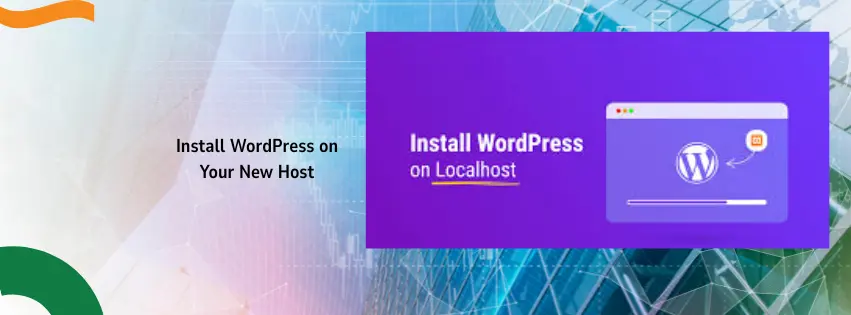
Once you’ve signed up with your new host, the next step is installing WordPress. This is the platform you’ll rebuild your site on. WordPress is open-source, meaning you own everything and can move it to any host at any time in the future.
Most South African hosts, including Truehost, offer a one-click WordPress installer through cPanel called Softaculous.
To install WordPress via Softaculous:
- Log in to your cPanel dashboard
- Find the “Softaculous Apps Installer” section
- Click on “WordPress”
- Click “Install Now”
- Fill in your site name, admin username, and password
- Click “Install”
WordPress will be live on your new hosting account in under two minutes.
Step 4: Export Your Blog Content from Wix
Wix doesn’t give you a full export button. However, if you have a blog, you can use the RSS feed method to pull your posts across.
How to get your Wix RSS feed:
- Add
/blog-feed.xmlto the end of your Wix website URL- Example:
yourdomain.co.za/blog-feed.xml
- Example:
- A page of XML code will appear in your browser
- Right-click and select “Save Page As”
- Save the file as
feed.xmlon your computer
Note: This only works for older Wix blogs. Newer Wix blogs have limited RSS feed support. If your blog-feed.xml page shows a Wix error, you may need to manually copy and paste your posts.
Step 5: Import Your Blog Posts into WordPress
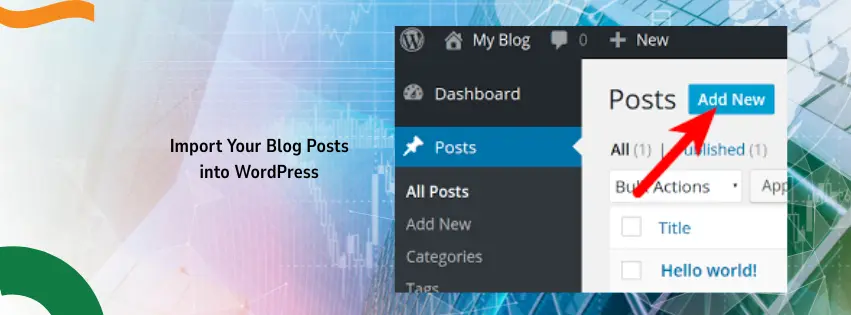
Now that you have your RSS file, bring it into WordPress.
- Log in to your WordPress dashboard
- Go to Tools > Import
- Find the RSS option and click Install Now
- Once installed, click Run Importer
- Click Choose File, select your
feed.xmlfile - Click Upload file and import
Your blog posts will now appear under Posts > All Posts in WordPress.
Important: Images in your blog posts will still be pointing to Wix’s servers after import. Install the free plugin Auto Upload Images from the WordPress plugin directory. It automatically downloads and saves those images to your new WordPress media library when you update each post.
Step 6: Manually Rebuild Your Static Pages
Blog posts aside, your regular pages (Home, About Us, Services, Contact) must be rebuilt manually. There is no automated way to transfer Wix pages to WordPress.
How to do it efficiently:

- Open each Wix page in one browser tab
- Open your WordPress dashboard in another
- Go to Pages > Add New in WordPress
- Copy the text content from Wix and paste it into the WordPress editor (Gutenberg)
- Re-upload any images for that page using the Media > Add New option
- Rebuild forms using a free plugin like WPForms Lite
Start with your most important pages first — usually Home, Services, and Contact.
Step 7: Transfer Your Domain Name from Wix
If your domain is registered with Wix, you can transfer it to your new host. According to Wix’s official domain transfer guide, the process works like this:
- Go to Domains in your Wix account
- Click the Domain Actions icon next to your domain
- Select Transfer away from Wix
- Click Transfer Domain, then confirm
- Wix will send an EPP (authorization) code to your registrant email
- Take that code to your new host (e.g., Truehost) and use it to initiate the transfer
Key things to know:
- Domain transfers can take up to 7 days to complete
- You cannot transfer a domain within 60 days of purchase
- Business email MX records need to be re-added after the transfer
- Keep your Wix subscription active during this period to avoid downtime
Step 8: Set Up 301 Redirects for SEO
This is a step many people skip — and then wonder why their Google rankings drop. If your Wix URLs were yourdomain.co.za/services and your new WordPress URLs are different, Google will see them as brand-new pages with no history.
Set up 301 redirects to tell Google that your old pages have permanently moved to new addresses.
How to do it in WordPress:
- Install the free plugin Rank Math SEO or Yoast SEO
- Both plugins include a redirect manager
- Map each old Wix URL to its new WordPress equivalent
- Test each redirect using a tool like Redirect Checker
Try to keep your URL structure the same on WordPress as it was on Wix. This makes the redirect setup much easier.
Step 9: Test Everything Before Going Live
Before you point your domain to your new WordPress site, run through this checklist:
- [ ] All pages load correctly and look right on mobile
- [ ] All images display properly
- [ ] Contact forms send test emails successfully
- [ ] Blog posts display with correct images
- [ ] Navigation menus link to the right pages
- [ ] SSL certificate is active (your URL should show
https://) - [ ] Site loads in under 3 seconds (test with Google PageSpeed Insights)
Once everything checks out, update your domain’s nameservers to point to your new host and your site goes live.
Wix vs. Local Hosting: A Quick Comparison for SA Businesses
| Feature | Wix | Truehost |
|---|---|---|
| Monthly cost | R200–R700+ | From R35/month |
| Server location | Global (not SA-based) | South Africa |
| Site portability | Locked to Wix | Move anytime |
| Custom code access | Limited | Full access |
| Free SSL | Yes | Yes |
| cPanel control | No | Yes |
| Scales with your business | Limited | Shared, VPS, Dedicated |
| Local support | No | Yes (24/7) |
Frequently Asked Questions
Can I transfer my Wix website directly to another host?
No. Wix is a closed platform, which means your site is tied to their servers. You need to rebuild your site on an open platform like WordPress and then host it with a provider of your choice.
Will I lose my Google rankings during the migration?
You can avoid major ranking drops by setting up 301 redirects, keeping your URL structure the same, and making sure your new site is mobile-friendly and fast. Skipping redirects is the biggest mistake people make.
How long does a Wix to WordPress migration take?
A small business site with 5–10 pages and up to 30 blog posts can take 4–8 hours if you do it yourself. Larger sites with hundreds of posts will take longer.
Can I keep my domain name?
Yes. You can transfer your domain away from Wix using an EPP code. The transfer can take up to 7 days. If your domain is with a third-party registrar already, you just update the nameservers.
Is WordPress difficult to use after Wix?
There is a small learning curve. But WordPress’s Gutenberg editor is beginner-friendly, and most South African hosts like Truehost offer 24/7 support to help you get comfortable.
Does Truehost offer migration help?
Yes. Truehost SA offers free website migration for businesses moving from another host. While a Wix-to-WordPress move requires a rebuild rather than a direct transfer, their team can assist with setting up WordPress and pointing your domain correctly.
Ready to Make the Move?
The website migration SA process from Wix to local hosting is not instant, but the long-term benefits are worth it — lower costs, faster speeds for your SA visitors, full control over your site, and no risk of being locked out if Wix changes its pricing.
Get started with Truehost South Africa today and take your business website off the rental model for good.