Web Hosting
 Windows HostingBuilt for Windows apps and websites – stability, speed and flexibility
 Reseller HostingLaunch a hosting business without technical skills or expensive infrastructure
 Affiliate ProgramRefer customers and earn commissions from sales across our platform
 Domain SearchFind and secure a domain name in seconds with our quick lookup tool
 CO ZA Domains
 All DomainsExplore domain names from over 324 TLDs globally – all in one place
 Free Whois Lookup Tool South Africa
 VPS
VPS Website Builder
 Online ShopSet up a sleek eCommerce store with zero coding knowledge
 SSLs
SSLs SupportAccess help articles, how-tos, and everything about our services
 Blog
Blog Contact UsReach our team instantly via live chat or drop us an email
You registered your .co.za domain. You signed up for an email service. Now you are staring at a DNS panel, wondering which field goes where.
Nothing is showing up in your inbox. That feeling is one of the most common frustrations for South African business owners right after domain registration.
This guide works through MX record setup for the most popular email services on .co.za domains. It also covers the South Africa-specific propagation details that generic guides skip.
Table of Contents
What MX Records Actually Do (And Why Your Email Depends on Them)
An MX record is a DNS entry that tells every mail server on the Internet where to deliver your email. It works like a postal sorting office for your domain.

Every time someone sends an email to [email protected], their server queries your DNS for an MX record. That record returns the address of your mail server. The email gets routed there.

Without a valid MX record, your inbox simply does not exist to the outside world.
Every MX record has two main fields. The first is the mail server address, a fully qualified domain name like aspmx.l.google.com. The second field is the priority number.
A lower number means a higher preference. If you have two MX records with priorities 1 and 5, priority 1 gets tried first. This setup gives you automatic failover if your primary server goes down.
MX Records Prerequisites
Before you can begin setting up MX records, you will need to sort out some things, such as obtaining the records and cleaning up domain records.
Where To Get MX Records
You can get MX records from your email hosting provider’s welcome email, or you can use third-party tools such as MXToolbox.
If you bought your domain name and email hosting plan from the same provider, they will automatically set up MX records pointing to their nameservers.
Check for a Conflicting CNAME Record
Before you add a single MX record, check for a CNAME on your bare domain. The bare domain is your address without “www”, for example, yourbusiness.co.za.
A CNAME record sitting on that same address will override your MX record completely. Your email will not work, even if the MX record looks perfectly set up.
Log in to your DNS manager and carefully review your current records. Look for any CNAME that points directly to yourbusiness.co.za. If you find one, remove it before going any further.
Lower Your TTL 24-48 Hours Before Making Changes
TTL stands for Time to Live. It controls how long DNS servers cache your records. A high TTL means that old information stays cached for longer when you update.
Lowering your TTL to 300-600 seconds, about 24-48 hours before your planned changes, helps a lot. Once you flip the switch, your new record spreads across DNS servers far more quickly.
If you are making changes right now without prior preparation, that is perfectly fine. Just proceed and allow a slightly longer wait before email starts flowing.
How To Set Up MX Records
Log in to your web hosting account and find your .co.za domain in the My Domains section. Follow these steps to add your MX record.
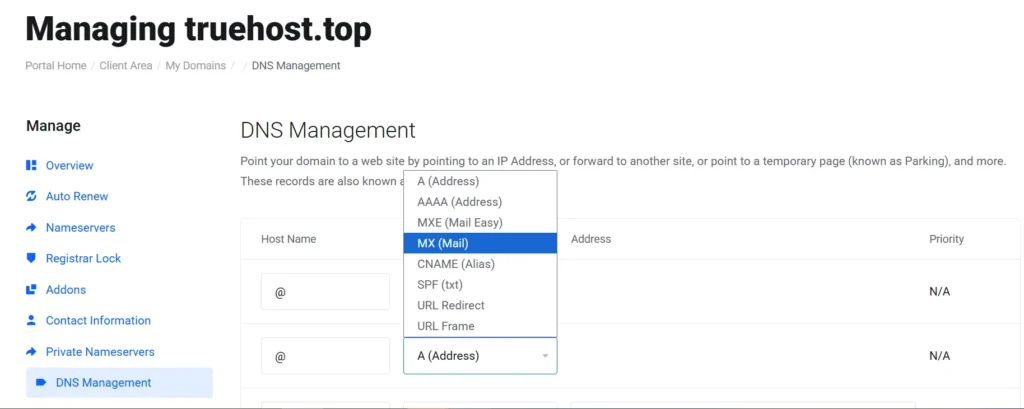
- Click on your domain name to open its settings.
- Select DNS Manager from the domain settings menu.
- Click Add Record and choose MX from the record type list.
- Set the Host field to @ for the root domain.
- Enter your mail server address in the Points To field.
- Set the Priority number to the one provided by your email service.
- Set TTL to 3600 seconds (one hour) and save the record.
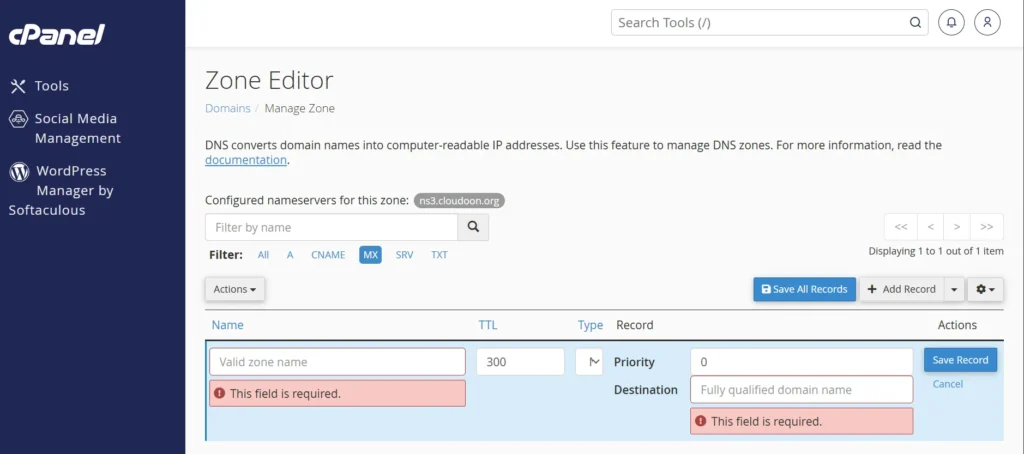
- You need to update the email routing setting inside cPanel. Go to the Email section and click Email Routing.
- Select your domain from the dropdown menu. Switch the setting to Remote Mail Exchanger and click Save.
After MX Records: The Three Authentication Records You Cannot Skip
Setting up MX records gets your email delivered. Authentication records control whether that email reaches the inbox or goes straight to spam.
In February 2024, Google and Yahoo made SPF, DKIM, and DMARC mandatory for bulk senders. Smaller senders still face inbox placement risks without them.
Set these up right after your MX records are live. Skipping them is the fastest way to find your legitimate business emails landing in spam folders.
SPF Record (Sender Policy Framework)
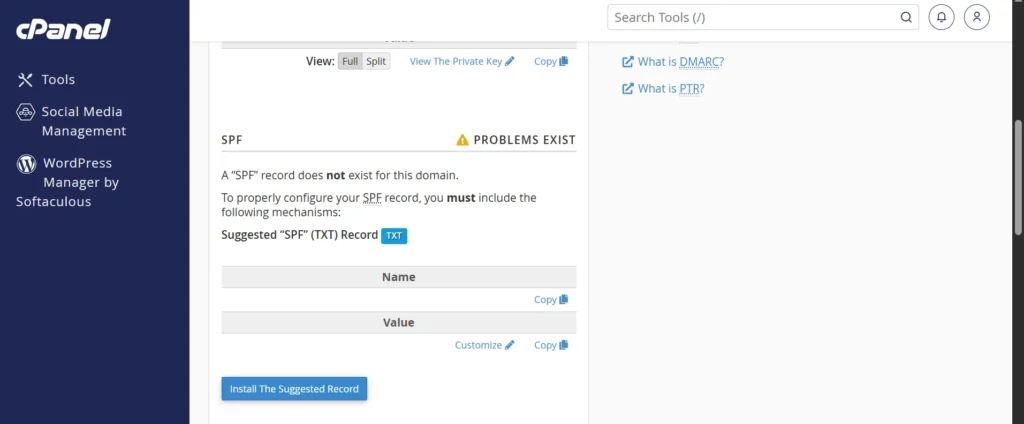
An SPF record lists every server that is allowed to send email from your domain. Mail servers check this list when they receive your emails.

If the sending server is not on the list, the email may get flagged or rejected. SPF records are stored as TXT records in your DNS panel.
You can only have one SPF record per domain. If you use more than one sending service, combine them into a single record, like this:
v=spf1 include:_spf.google.com include:sendgrid.net ~allAdd that combined string as a single TXT record in your DNS panel with Host set to @.
DKIM Record (DomainKeys Identified Mail)
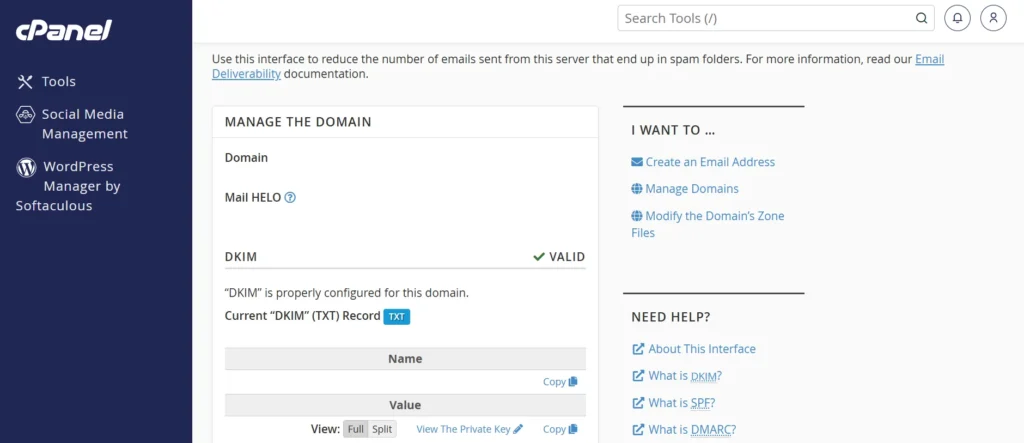
DKIM adds a digital signature to every email you send. The receiving server checks that signature against a public key stored in your DNS.
If the signature matches, the email is confirmed as legitimate. This stops mail providers from treating your messages as forged or suspicious.
Generate your DKIM key from inside your email provider’s admin panel. Your DKIM key is published as a CNAME or TXT record in your DNS, depending on you DNS provider.
DMARC Record (Domain-based Message Authentication)
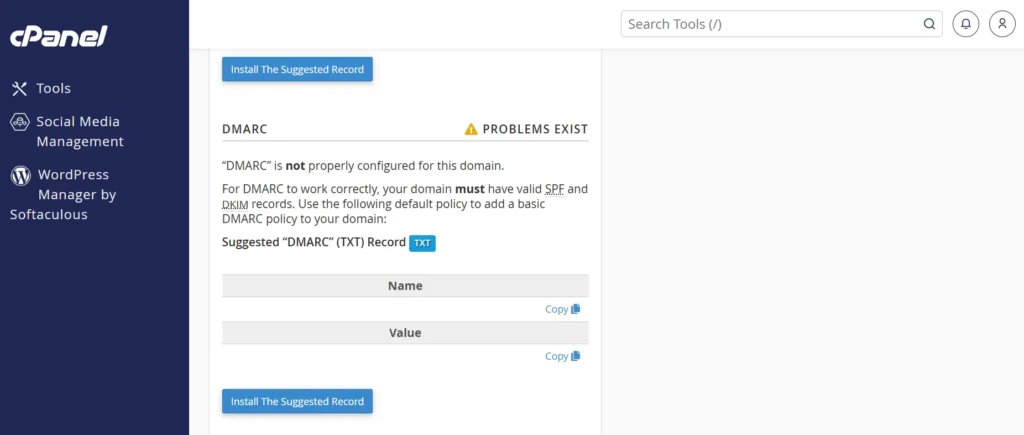
DMARC ties your SPF and DKIM records together into a single policy. It tells receiving servers what to do when an email fails SPF or DKIM checks.
You publish DMARC as a TXT record in your DNS panel. The Host for this record is always _dmarc.
Start with p=none. This setting monitors your email traffic without blocking anything. Once all your legitimate sending sources pass correctly, move to p=quarantine or p=reject.
Replace [email protected] with a real address where you want DMARC reports delivered. These reports show you who is sending mail from your domain.
How Long Does DNS Propagation Take for .co.za Domains?
This is the question that causes the most post-setup anxiety. Most guides say 24 to 48 hours and leave it there. The truth is more layered than that.
ZARC, the registry behind .co.za domains, operates redundant name servers across South Africa. Local propagation is typically faster than global propagation.
For most South African users, changes show up within 1 to 4 hours. Full global propagation can still take up to 48 hours in some cases.
You can track your MX record propagation in real time using MXToolbox at mxtoolbox.com/MXLookup.aspx. Type your domain into the search bar and click MX Lookup.
The tool shows which DNS servers have picked up your new record and which ones have not yet. This gives you a clear picture of where things stand without having to guess.
MX Records Not Working? Work Through This Checklist
You followed the steps. You added the records. Email still is not working. Go through this list item by item before contacting support.
- Did you remove old MX records before adding new ones? A leftover record from a previous provider can still pull your email away.
- Is there a CNAME record on the bare root domain? If yes, remove it. It overrides your MX record silently.
- Did you set Email Routing to Remote Mail Exchanger in cPanel? Skipping this means your server handles email locally and ignores your MX record.
- Have you verified domain ownership in your email provider’s admin panel? Google Workspace and Microsoft 365 both require this before email starts working.
- Has it been less than 48 hours? Use MXToolbox to check propagation status before assuming something is broken.
- Is your priority number correct? The MX record with the lowest number gets used first. If an old record has a lower number, email still routes to the old server.
Final Thoughts
Most .co.za email problems trace back to three things: a leftover MX record from an old provider, a missing cPanel routing switch, or no authentication records at all.
If you worked through this guide, none of those apply to you anymore.
Skip the DNS headaches on your next professional email. Truehost ZA handles email hosting for .co.za domains with local support and competitive pricing.