Web Hosting
 Windows HostingBuilt for Windows apps and websites – stability, speed and flexibility
 Reseller HostingLaunch a hosting business without technical skills or expensive infrastructure
 Affiliate ProgramRefer customers and earn commissions from sales across our platform
 Domain SearchFind and secure a domain name in seconds with our quick lookup tool
 CO ZA Domains
 All DomainsExplore domain names from over 324 TLDs globally – all in one place
 Free Whois Lookup Tool South Africa
 VPS
VPS Website Builder
 Online ShopSet up a sleek eCommerce store with zero coding knowledge
 SSLs
SSLs SupportAccess help articles, how-tos, and everything about our services
 Blog
Blog Contact UsReach our team instantly via live chat or drop us an email
Most people think DNS changes go live the moment you hit save. They do not.
A hidden timer called TTL decides when the rest of the internet catches up, and most South African domain owners never touch it.
TTL controls how long it takes for your .co.za domain to update after a DNS change. Set it wrong, and you wait 24 hours. Set it right, and you wait 5 minutes.
This guide explains exactly how TTL works. It covers how to set it up correctly and avoid losing sleep over DNS changes.

Table of Contents
What TTL Actually Means

TTL stands for Time to Live. It is a countdown timer attached to every DNS record.
The timer is measured in seconds. When it hits zero, DNS servers fetch fresh data from the source.
Until the timer hits zero, servers serve the cached (stored) copy of your old data.
Where TTL Lives in a DNS Record
Every DNS record contains a TTL number. Here is what a real .co.za record looks like:

mybusiness.co.za. 3600 IN A 102.89.150.22The number 3600 is the TTL. It tells servers to cache this record for 3,600 seconds. That equals exactly one hour. After one hour, servers go check for updates.
The letter A tells servers this is an address record. The IP at the end is where your website lives.
How TTL Connects to DNS Propagation for .co.za Domains
When you save a new DNS record, your hosting panel updates immediately.
But that change does not reach everyone at once. ISPs across South Africa store a cached copy of your old record.
They hold onto that copy until the TTL expires. Only then do they check for a newer version.
Telkom, Vodacom, MTN, Afrihost, and Rain each run their own DNS servers.
Each server checks for updates at different times. So your new site may show for one person in Cape Town.
Meanwhile, someone in Durban still sees the old version. That gap is normal. It is simply the TTL doing its job.
The TTL Countdown, Step by Step
Here is a real example. Your TTL is set to 3600 seconds. You make a DNS change at 10:00 AM.
| Time | What Happens |
|---|---|
| 10:00 AM | Your authoritative server shows the new record immediately. |
| 10:30 AM | DNS resolvers still serve the cached old record. TTL has 1800 seconds left. |
| 11:00 AM | TTL reaches zero. Resolvers fetch the new record. Most users now see the update. |
| 12:00 PM | Straggler servers have caught up. The change is live everywhere. |
The key point here is that the higher your TTL, the longer that whole process takes.
TTL Values Explained: Which Number Should You Pick?
TTL values fall into four practical ranges. Each range suits a different situation.
| TTL Range | Duration | Best Used For |
|---|---|---|
| Short | 60 to 300 seconds | Server migrations, email setup, testing. |
| Medium | 600 to 3600 seconds | Production sites that change occasionally. |
| Standard | 3600 to 14400 seconds | Stable business websites with rare changes. |
| Long | 43200 to 86400 seconds | Fully stable environments. Changes are rare. |
The Old Default That Still Haunts .co.za Owners
Many South African hosting panels pre-fill a TTL of 86,400 seconds. That is 24 hours.
This default comes from DNS standards written in 1987. Back then, servers were slow and underpowered.
That made sense in the 80s. Today, it causes long delays during migrations and configuration changes.
Control panels like cPanel often still use this old default value.
Always check your TTL before making any DNS edits. If it sits at 86,400, lower it first.
Wait 24 to 48 hours after lowering it, then make your planned change. This saves you a full day of downtime.
The Right TTL for Each DNS Record Type on Your .co.za Domain
Different DNS records serve different purposes. Their ideal TTL values reflect that.
| Record Type | Recommended TTL | Reason |
|---|---|---|
| A Record | 3600 seconds | Points website to server IP. Changes rarely. |
| CNAME | 3600 seconds | Alias record. Stable for most setups. |
| MX Record | 300 sec (setup) / 3600 after | Email routing. Lower during email migrations. |
| TXT (SPF / DKIM) | 300 sec (setup) / 3600 after | Domain verification. Lower during Workspace setup. |
| NS (Nameserver) | 86400 seconds | Should rarely change. High TTL is fine here. |
How to Lower TTL Before Making DNS Changes
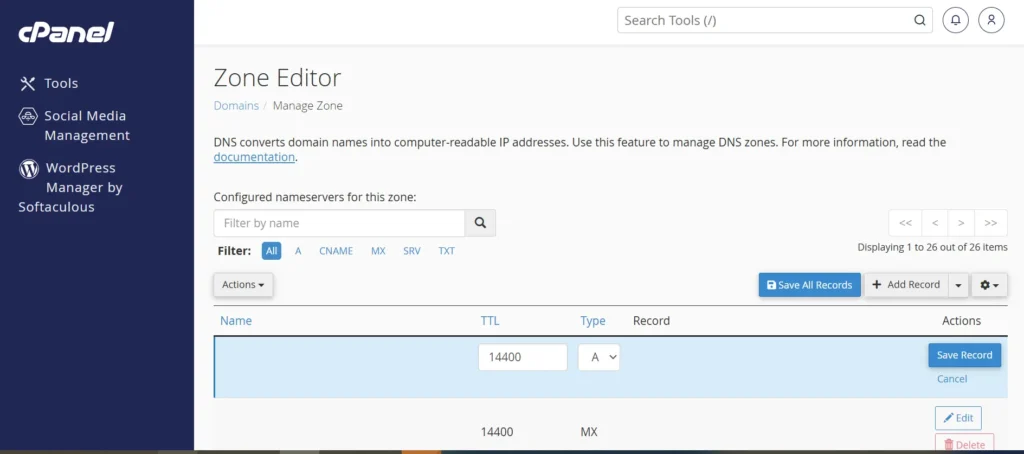
Step 1: Log in to Your Hosting or Registrar Control Panel.
Open cPanel or Plesk control panel and use your credentials to log in. Locate the DNS Zone Editor or DNS Manager.
Find the specific record you plan to change. Note the current TTL value before touching anything.
Step 2: Set the TTL to 300 Seconds. Save. Then Wait 24 to 48 Hours.
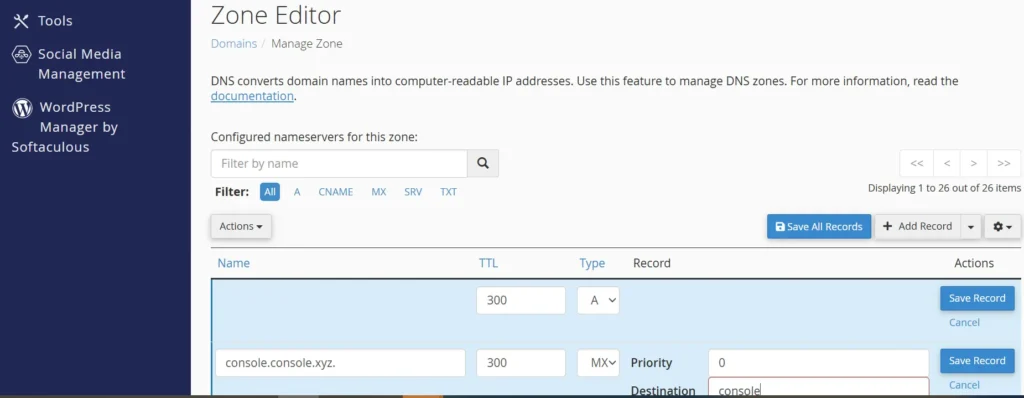
This lets the current high TTL expire across all caching servers worldwide.
After that waiting period, all servers refresh your record every 5 minutes.
Step 3: Make Your DNS Change. Then Restore the TTL to 3600 or Higher.
Leaving a TTL at 300 permanently increases server query load noticeably.
Always restore it after your change is confirmed and propagation is complete.
What Happens If You Forget to Lower TTL First?
Forgetting to lower TTL first is the most common DNS mistake seen on .co.za domains.
Once you make a change with a high TTL active, you cannot force an update.
You simply have to wait for the existing TTL to expire on every caching server.
How to Check DNS Propagation for Your .co.za Domain
Three free tools make it easy to track propagation for a .co.za domain.

| Tool | Website | Best For |
|---|---|---|
| WhatsMyDNS | whatsmydns.net | Checks A, MX, TXT records across global locations. |
| DNS Checker | dnschecker.org | Verifying A, CNAME, and NS records by country. |
| MXToolbox | mxtoolbox.com | Checks A, MX, and TXT records across global locations. |
Reading Propagation Results: Green, Red, and Mixed
After making a DNS change, mixed results are completely normal for the first few hours.
Some servers show green, meaning the new record is live. Others show red, meaning the old record is cached.
That mix simply means propagation is still in progress. Give it more time before worrying.
You should investigate if any of the following apply:
- More than 48 hours have passed, and most servers still show red.
- MX records still show red more than 24 hours after the change.
- Nameservers still show red 72 hours after a switch.
In those cases, check that you saved the record correctly in your DNS panel. Also, verify there are no duplicate or conflicting records in your DNS zone file.
Common TTL Mistakes on .co.za Domains

Mistake 1: Setting a Low TTL and Leaving It There
Many .co.za owners lower TTL to 300 seconds during a migration, then forget to raise it.
A TTL of 300 seconds means DNS servers query your authoritative server every 5 minutes.
Under heavy traffic, this generates a significant load on your server over time.
The fix: After your migration is complete and propagation is confirmed, set the TTL back to 3600-7200 seconds. Set a calendar reminder to check TTL values after every DNS change you make.
Mistake 2: Changing Nameservers Without Lowering TTL
Nameserver changes are the most disruptive DNS updates you can make to a domain.
They affect every record under your domain, not just one specific record.
Nameserver changes can take up to 48 hours to propagate.
The fix: Lower TTL on all records at least 48 hours before switching nameservers.
Also, confirm that the new nameservers are fully configured and active before making the switch.
Mistake 3: Ignoring MX Record TTL During Email Migrations
Email migrations are time-sensitive. A high TTL on MX records during a Google Workspace setup causes problems.
Bounced emails and missed messages can last for days. Some of those emails are permanently lost.
The fix: Set your MX TTL to 300 seconds at least 24 hours before starting any email migration.
Once the migration is complete and email delivery is confirmed, raise TTL back to 3600 seconds.
Remember to verify SPF and DKIM records with MXToolbox before raising the TTL.
Quick-Reference TTL Cheat Sheet for .co.za Domain Owners
Domain owners in South Africa can use this table to determine the best TTL for various scenarios.
| Scenario | Recommended TTL | Expected Propagation Window |
|---|---|---|
| Stable business site | 3600 to 7200 sec | 2 to 4 hours |
| New domain setup | 3600 sec | 2 to 4 hours |
| Server migration (pre-change) | 300 sec | 15 to 30 minutes |
| Email provider switch | 300 sec | 15 to 30 minutes |
| Testing or staging environment | 60 to 300 sec | 5 to 15 minutes |
| Post-migration (restore) | 3600 to 7200 sec | 2 to 4 hours |
Frequently Asked Questions
What does TTL mean for a .co.za domain?
TTL stands for Time to Live. It is the number of seconds per DNS record. It tells DNS servers how long to hold a cached copy before fetching fresh data.
How long does DNS propagation take in South Africa?
A record and CNAME changes take 30 minutes to 24 hours. MX and TXT updates take 1 to 24 hours. Nameserver changes can take up to 48 hours.
What TTL value should I set for my South African website?
3600 seconds (one hour) works for most business websites. Use 300 seconds only before planned changes or during a migration.
Why is my .co.za domain not showing after DNS changes?
Your old TTL is still cached on ISP servers across South Africa and globally. The site appears once the TTL expires. Check propagation using WhatsMyDNS or DNS Checker.
Can I speed up DNS propagation for my .co.za domain?
Yes. Set TTL to 300 seconds before making changes, at least 24 to 48 hours in advance. You can also test with Google DNS (8.8.8.8) or Cloudflare (1.1.1.1) for faster, more up-to-date results.
Take Full Control of Your Domain
TTL is not a set-and-forget number. It needs attention before every DNS change you make. Lower it 48 hours before any migration. Remember to restore it after propagation confirms.
Check your MX records separately before any email switch. Those three habits alone will save you hours of downtime on your .co.za domain every single time.
Register your .co.za domain at Truehost and take full control of your DNS settings today.